Best Time Lapse Video Camera for Outdoor Projects and Plant Growth
Searching for a time lapse video camera that handles long-term outdoor shoots, low light, and battery life? This guide highlights five strong options and shows who each is best for. These picks are ideal for construction sites, gardening timelines, and nature projects. The article explains key differences, battery life, and how easy they are to operate with or without apps. A compact buying table helps you compare at a glance.
Product Comparison Snapshot
- Hojocojo Time Lapse Camera — Best for extended outdoor builds with long battery life.
- GOWWPUN Time Lapse Camera — Best for WiFi-enabled remote control and quick setup.
- Dsoon Time Lapse Camera — Best for versatile 4K imaging and durable exterior.
- FUVISION Time Lapse Camera — Best for app-based control and 4K video with high resolution photos.
- ATLI X10 Time Lapse Camera — Best for low-light performance and built-in weather-ready features.
Hojocojo Time Lapse Camera — 4K Outdoor Timelapse
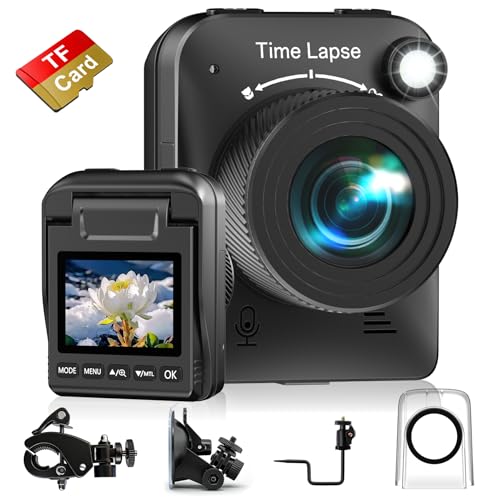
The Hojocojo 4K timelapse camera is designed for long-term outdoor shoots. It features a powerful 4K sensor with a fill light to improve visibility in low light. An IPS display can flip 90 degrees, making angle adjustments convenient on uneven sites. The battery lasts up to 180 days at a 5-minute capture interval, enabling extended projects without frequent recharging. Setup is quick once power is connected, with continuous cycling until storage fills. Best for construction crews and researchers who need sustained, high-quality imagery without frequent maintenance.
Best for: Construction sites and landscape projects requiring steady, long-term image capture. Choose this if you need a rugged, high-resolution camera with reliable half-year battery life and easy angle adjustments.
Caution: Battery performance may vary with extreme temperatures; ensure power supply is stable for uninterrupted operation.
GOWWPUN Time Lapse Camera — 4K With WiFi

The GOWWPUN timelapse camera records 48MP images and 4K video at 10 FPS. It includes 2.4G WiFi and Bluetooth Low Energy 5.0 for remote control via a mobile app. A simple three-step setup approach makes long shoots feasible: turn on, set, and start. This model is best for shooters who want app-based control, pre-programmed timelapses, and quick previews from the field. It’s well-suited for capturing plant growth, city traffic, and nature events.
Best for: Remote or field users who value WiFi connectivity and quick, app-driven configuration. Choose this if you want to preview progress remotely and edit sequences on the go.
Caution: Requires a compatible mobile app and stable WiFi range to leverage full remote features.
Dsoon Time Lapse Camera — IP66 Durability

The Dsoon TL3000 fortifies a 4K timelapse with IP66 rating, meaning strong water and dust resistance for harsh outdoor environments. The IPS display flips to 90 degrees for flexible shooting angles, and the battery life extends up to 180 days with a 5-minute capture interval. Setup is straightforward: connect to power, keep capturing, and let the SD card fill. This camera is top-tier for long outdoor projects where weather resistance matters as much as image quality.
Best for: Construction or weather-monitoring sites where exposure to rain, dust, or wind is common. Choose this if you need rugged durability with solid 4K performance.
Caution: Heavier exposure to the elements may require protective housing beyond typical usage in very dusty environments.
FUVISION Timelapse Camera — App Control, 4K Video

The FUVISION timelapse camera emphasizes app control with no LCD screen, enabling seamless operation from a connected device. It records 4K interpolated video and 64MP photos, supporting indoor and outdoor projects like construction timelapses, plant growth, and cooking sequences. The camera offers macro and infinite focus, plus multiple recording modes including motion-detection timelapse. Battery life reaches up to six months at 15-minute intervals. Best for users who want a clean, app-driven workflow without a ruggedized display.
Best for: Indoor or controlled-environment timelapses where a smartphone app can govern the capture process. Choose this if you prefer high-resolution stills and professional-looking 4K video with minimal hardware on-site.
Caution: Absence of a built-in LCD screen may slow on-site adjustments; ensure the app is ready and connected before shooting.
ATLI X10 Time Lapse Camera — Low Power, 4K

The ATLI X10 delivers 4K timelapse with Wi-Fi app control and a focus on low power consumption. It comes with a pre-installed 128GB card and emphasizes a broader exposure range for vibrant color and detail. A manual focus option supports macro shots as well as long-distance scenery, which helps when you want precise control over depth of field. Best for: outdoor projects that require sharp, colorful sequences with flexible focus and reliable app-based control.
Limitation: May require additional on-site power solutions for extended shoots, depending on interval settings and weather conditions.
Buying Guide: Timelapse Cameras For Your Projects
What should you consider when choosing a timelapse camera? Take these factors into account to match the camera to your project and environment.
- Battery life and power options: For long projects, look for cameras advertising half-year battery life with longer capture intervals, or those that support continuous external power.
- Image quality: Prioritize 4K resolution for sharp detail in both video and photos. Consider cameras offering high-resolution stills (e.g., 64MP) for later editing.
- Low-light performance: A model with fill light or a strong sensor helps when shooting at dawn, dusk, or shaded sites.
- Durability and weather resistance: IP ratings (such as IP66) protect against dust and water for outdoor use.
- Connectivity and control: WiFi/app control is convenient for remote monitoring, but note that some setups work best with local power and no screen.
- Focusing options: Manual focus or adjustable focus help capture macro details or expansive scenes with consistent clarity.
- Storage: Ensure sufficient SD card capacity or cloud options to handle long sequences without filling up prematurely.
- Mounting and angle flexibility: Look for cameras with adjustable displays or mounting brackets to align shots precisely on uneven sites.
Frequently Asked Questions
- How long can a timelapse camera shoot without recharging?
– Many models advertise up to 180 days with certain capture intervals; actual duration depends on interval and battery efficiency. - Is WiFi important for timelapse cameras?
– WiFi is helpful for remote setup and previewing shots, but not essential if the camera is properly powered and configured on-site. - What resolution should I choose for outdoor timelapses?
– 4K video provides the best detail for modern displays; pair with high-resolution stills when possible. - Do timelapse cameras require a lot of storage?
– Yes. Long shoots generate many frames; choose a camera that supports large capacity SD cards and efficient looping. - Can these cameras work without internet access?
– Yes. Many operate offline; WiFi features are optional for remote control, not required for recording. - What is the best camera for plant growth timelapse?
– Cameras with stable battery life, good macro focus, and reliable 2.4 GHz WiFi app control are ideal, especially when you need consistent daily shots.