Best Webcam With HDMI Output for Clear, Flexible Streaming and Close-Ups
When you need a webcam that can export video to an HDMI display or capture device while also offering USB connectivity, these five models stand out. They’re suited for different use cases—from long-distance streaming and professional video calls to close-up work in education or manufacturing. The following sections present each option with its best-use scenario and a concise buying guide.
| Product | Best For | HDMI/USB Output | Key Benefit |
|---|---|---|---|
| SVPRO 4K Streaming Webcam | Professional streaming and live events | HDMI & USB | 10x optical zoom, 4K at 30fps, flexible manual focus |
| IFWATER HDMI USB Camera 4K | Education and teaching with screen sharing | HDMI & USB | 4K USB camera, plug-and-play, 2.8-12mm manual zoom |
| MOKOSE 12MP HDMI Camera | Close-up work and studio monitoring | HDMI | 4K/30fps HDMI output, robust build, CS mount |
| ELP 4K HDMI USB Camera Wide Angle | Wide classroom or conference room | HDMI & USB | 120-degree wide lens, no distortion, 4K output |
| ELP 4K USB HDMI USB Camera with Zoom | Versatile, versatile distance shots | USB & HDMI | 5-50mm zoom range, 3840×2160 at 30fps, close-up to distant shots |
SVPRO 4K Streaming Webcam With 5-50mm Zoom Lens

Best For: Professional streamers and long-distance imaging that require high-resolution video and detailed zoom control. This model includes a 5-50mm lens with 10x optical zoom and a 1/2.8” IMX415 sensor for clear 4K footage at 30fps. The dual HDMI and USB outputs support flexible workflow—from PC capture to external displays.
- HDMI and USB dual output enable simultaneous recording and live monitoring.
- Ultra HD 4K/30fps with a low-latency pipeline for real-time use.
- Manual zoom and iris adjustments for precise control of subjects at various distances.
Best For: Users who need precise manual focus and zoom for clinical, industrial, or broadcast-style setups. Caution: The unit relies on external capture hardware to maximize HDMI output in some configurations.
IFWATER HDMI USB Camera 4K With 4x Zoom

Best For: Classrooms, telemedicine, or online education where HDMI output is needed for large displays. It supports simultaneous HDMI and USB outputs, and uses a 2.8-12mm manual zoom to adjust framing in real time.
- 4K Ultra HD video with 1/2.8” IMX415 sensor for rich color and detail.
- Plug-and-play USB-C power and dual display outputs for easy deployment.
- Manual zoom helps capture both wide and close-up subjects without software tweaks.
Best For: Avoid this if you need autofocus or built-in AI features, as the lens is manually controlled and lighting can impact image quality in some rooms.
MOKOSE 12MP HDMI Camera For Studio and Education
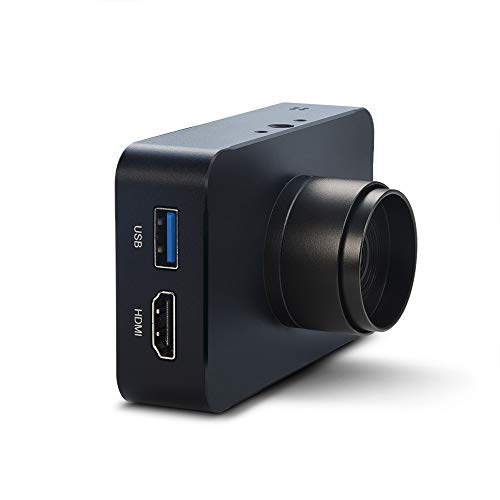
Best For: Studios and educators needing HDMI output for large monitors or projectors, with high-resolution capture. This 12MP camera outputs 4K via HDMI and supports stable streaming via HDMI interfaces, with a solid aluminum shell for durability.
- HDMI output supports 3840×2160 at 30fps for sharp, broadcast-like video.
- Solid build with multiple mounting options for versatile setups.
- Isolated from distortion with careful lens and sensor design for close-up shots.
Best For: Choose this if your workflow centers on HDMI-first displays, but be mindful of setup complexity and the need for compatible capture hardware in some environments.
ELP 4K HDMI USB Wide-Angle Camera

Best For: Large rooms or group teaching where a wide, distortion-minimized view matters. This camera combines 4K output with a 120-degree wide lens and USB plus HDMI simultaneous output for flexible displays.
- Wide 120-degree field of view minimizes distortion at the edges.
- Supports 4K output with HDMI and USB simultaneous display modes.
- Three display modes give flexible integration into different setups.
Caution: The extremely wide angle can exaggerate perspective if not positioned carefully, so proper placement is important for the best results.
Choosing The Right HDMI-Output Webcam
When selecting a webcam with HDMI output, consider resolution, frame rate, lens type, and the availability of simultaneous USB output. A 4K sensor with 30fps provides crisp detail, but for live calls in low bandwidth environments, a 1080p option at 60fps can be more reliable. Manual zoom lenses offer precise framing for studio or classroom use, while fixed or auto-focus lenses suit general conferencing. Wide-angle lenses are ideal for group views, but may introduce distortion if mispositioned. Ensure your capture card or display supports the camera’s HDMI output to avoid bottlenecks.
- Resolution and frame rate: 4K/30fps vs. 1080p/60fps depend on your needs.
- Lens: 5-50mm manual zoom offers versatility; 2.8-12mm might be faster for quick framing.
- Output: HDMI for displays and capture cards; USB for PC streaming and conferencing.
- Mounting and compatibility: CS-mount or standard tripod threads add placement options.
Buying Guide: Key Considerations
What will you use the camera for? Identify whether you need close-up detail, a wide group view, or long-distance shot. If you require HDMI output for a display or capture device, verify both HDMI and USB capabilities and whether the device supports simultaneous output.
How important is lens control? Manual zoom lenses offer precise framing, while autofocus or fixed lenses simplify setup but may limit flexibility in dynamic rooms.
What about lighting? Cameras with robust light correction help in variable lighting—an important factor for home offices and classrooms alike.
How easy is setup and integration? Plug-and-play devices with standard USB-C power or USB-A connections reduce setup time, while a CS-mount option may add mounting flexibility for professional studios.
FAQ
- Do these cameras support both HDMI and USB outputs at the same time? Yes, several listed models advertise dual HDMI and USB outputs for flexible workflows.
- Is 4K the best option for every use case? 4K provides maximum detail, but 1080p can be smoother on limited bandwidth; pick based on your display and capture system.
- Can I use these cameras with consumer video conferencing apps? Most are designed for compatibility with typical conferencing software via USB; HDMI is for displays or capture cards.
- What is the benefit of a manual zoom lens? It allows precise framing across distances, which is valuable for studios and classrooms with fixed setups.
- Are these cameras suitable for distance learning or streaming? Yes, several models are optimized for long-range recording and live streaming with 4K or high-quality 1080p output.