Best Webcam With Bokeh Effects for Professional-Looking Streams and Calls
Looking for a webcam that delivers DSLR-like depth of field (bokeh) along with sharp 4K or high‑quality 1080p video? This guide highlights top options engineered to produce a natural, pleasing background blur while keeping you in crisp focus. The selections are especially suitable for streamers, content creators, and professionals who want a polished look without external cameras. Below, five picks emphasize bokeh-friendly optics, strong autofocus, and solid performance in varying light conditions. A quick summary table follows the introduction to help compare core specs at a glance.
| Product | Best For | Key Benefit |
|---|---|---|
| Insta360 Link 2 Pro | Streamers and presenters | Large sensor, DSLR-like depth of field, strong low-light |
| Insta360 Link 2 | Meetings and calls | Excellent HDR and auto framing with good bokeh |
| Insta360 Link 2C Pro | Compact setups with pro visuals | 1/1.3″ sensor, strong bokeh and framing |
| Insta360 Link 2C | Budget-conscious creators | 4K quality with smart framing and bokeh potential |
| YOLOLIV YoloCam S3 | DSLR-like control on a webcam | Cinematic effects and wide 82° FOV |
Insta360 Link 2 Pro – 4K PTZ Webcam

The Insta360 Link 2 Pro uses a large 1/1.3” sensor to deliver crisp 4K footage with HDR performance and strong low-light handling. It is designed for streamers and professionals who want DSLR-like depth of field (natural bokeh) directly from the webcam plus reliable autofocus. The camera supports AI framing to keep groups or individuals well composed during meetings or streams. Best for: streamers who want a premium look with subtle background blur and consistent framing. Caution: higher resolution output may require compatible software and hardware to realize full 4K potential.
- Best for: Streamers and professional presenters seeking high image quality and natural bokeh.
- Better for: Cine-like depth of field with reliable auto framing and crisp details.
Insta360 Link 2 – AI Tracking 4K Webcam

The Link 2 adds AI tracking, HDR, and a 4K sensor to maximize image fidelity while preserving natural background separation. The Phase Detection Auto Focus (PDAF) helps maintain sharpness as you move, making it suitable for dynamic streams or busy video calls. Best for: users who need consistent tracking and a clean, professional look with good bokeh. Limitation: some users may experience a learning curve with software controls for optimum bokeh balance.
- Best for: Real-time framing and smooth subject tracking during streams and meetings.
- Choose this if you want strong background separation and reliable auto framing.
Insta360 Link 2C Pro – 4K Web Cam
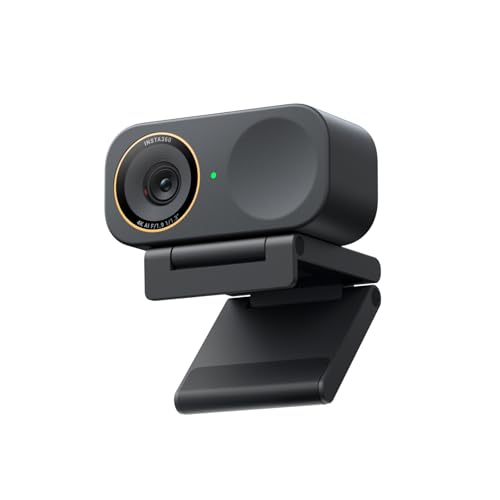
The Link 2C Pro features a large 1/1.3” sensor for cleaner 4K video and improved low-light performance. It includes a capable auto framing system and a dual-mic setup for clearer audio. The device supports DSLR-like depth through software-driven bokeh effects, making it a solid choice for creators who want a sharper foreground with soft background blur. Best for: professional calls and streams where crisp foreground detail and a touch of blur matter. Caution: more comprehensive software control may be needed to maximize bokeh aesthetics.
- Best for: Creators who want high-quality 4K with strong bokeh and reliable audio.
- Better for: Compact, high-fidelity setups where space is limited.
Insta360 Link 2C – 4K Webcam

The Link 2C combines a 1/2″ sensor with 4K capabilities and AI-driven noise reduction in the mics, delivering clear video and audio for calls and streams. It’s a more affordable option among Insta360’s bokeh-focused line while still offering true focus behavior (PDAF) and a natural blur for backgrounds. Best for: budget-conscious users who still want DSLR-like depth in 4K. Limitation: you may need to adjust lighting to ensure consistent bokeh in challenging scenes.
- Best for: Those who want a balance of 4K quality and natural background blur without breaking the bank.
- Choose this if you prioritize low-light performance at a lower price point.
YOLOLIV YoloCam S3 – 4K Streaming Webcam

The YoloCam S3 offers DSLR-like control with cinematic effects and uncompressed 4K/30fps video. It supports HDR and advanced autofocus for crisp close-ups, delivering a strong blend of professional aesthetics and practical usability. Best for: creators who want cinematic visuals and flexible exposure control. Caution: some features rely on USB-C connectivity and may require compatible software to access all effects.
- Best for: Users seeking cinematic streaming looks and flexible autofocus for varied scenes.
- Choose this if you want DSLR-like controls and cinematic effects in a webcam.
Buying Guide: What to Consider When Choosing a Bokeh-Focused WebCam
- Sensor size and image quality: Larger sensors tend to produce richer background blur and better low-light performance. Look for 1/1.3” or similar sensors for pronounced bokeh.
- Autofocus and framing: PDAF or fast autofocus helps maintain crisp foreground detail while background blur remains natural. AI framing helps keep you centered during movement.
- Background blur quality: Some cameras offer software-based bokeh; others rely on sensor and lens characteristics to render natural depth of field. Compare how convincingly the background softens while you remain sharp.
- Lighting features: Built‑in ring lights or HDR can improve bokeh appearance by balancing exposure. Ensure lighting controls are intuitive for quick setup.
- Microphones: Clear voice pickup is essential if you’re streaming or videoconferencing. Look for dual mics or noise suppression when background noise is a concern.
- Software and compatibility: Ensure the webcam works with your preferred streaming or conferencing software (OBS, Zoom, Teams, etc.). Check for auto-framing and gesture controls if you want dynamic layouts.
- System requirements: 4K output may demand more CPU/GPU power. If your setup isn’t high-end, consider 1080p at 60fps options that still offer pleasing blur effects.
FAQ
- What is bokeh on a webcam and why does it matter? Bokeh refers to the aesthetic blur in the out-of-focus areas of an image. It helps separate the subject from the background, creating a more professional look for streams and video calls.
- Which webcam is best for natural-looking background blur? High-end Insta360 Link 2 Pro and Link 2C Pro models emphasize large sensors and software-assisted depth to deliver DSLR-like blur in real time.
- Do these cameras require special software to enable bokeh? Some models rely on sensor and lens design to produce blur, while others offer software features. Check product pages for whether bokeh is hardware-driven or software-assisted.
- Can I use these webcams for meetings in dim rooms? Yes. Models with HDR and larger sensors typically perform better in low light, helping maintain a clean foreground and a soft background.
- Is 4K worth it for bokeh-heavy streams? If your software and hardware support it, 4K can enhance perceived depth and detail. If not, 1080p with high dynamic range often provides a strong balance of performance and blur.
- Which is the most versatile for different setups? The Insta360 Link 2 Pro and Link 2 offer robust AI framing, HDR, and multiple modes that adapt well to varying environments.