Best Video Monitor for Camera — Essential External Monitors for Filmmakers
Looking for the best video monitor for camera setups to improve framing, focus, and exposure? This guide compares top external field monitors across common shooting scenarios, from compact on-camera options to larger LCDs with advanced scopes. It helps creators decide which monitor fits a rig, budget, and shooting style. The picks are ideal for independent filmmakers, vloggers, event shooters, and surveillance-style setups needing reliable monitoring on the go.
- What type of buyer: individual creators and small crews needing portable, reliable external monitoring.
- Best for: on-camera screen replacements, true exposure and focus tools, and easy outdoor visibility.
| Product | Why It’s Relevant | Best For |
|---|---|---|
| FEELWORLD FW759 (7 Inch DSLR Monitor) | Slim, lightweight with 1280×800 IPS, 4K HDMI input | Traveling shooters and gimbal setups |
| NEEWER F700 (7 Inch Field Monitor) | High brightness 2000 nit, 4K HDMI loop in/out, LUT support | Outdoor shoots and professional monitoring |
| JINSWY 10.1 Inch Monitor | Multiple inputs and robust versatility for CCTV and cameras | Security, multi-source monitoring, portable small studios |
| FEELWORLD S55 V3 (6 Inch On-Camera Monitor) | Accurate focus tools with 3D LUT, sun hood included | Indoor studios and bright outdoor shooting |
| NEEWER F100 (7 Inch Field Monitor) | Balanced 1280×800, 450 nits, battery support, waveform and peaking | Independent filmmakers using handheld rigs |
FEELWORLD FW759 7 Inch DSLR Monitor
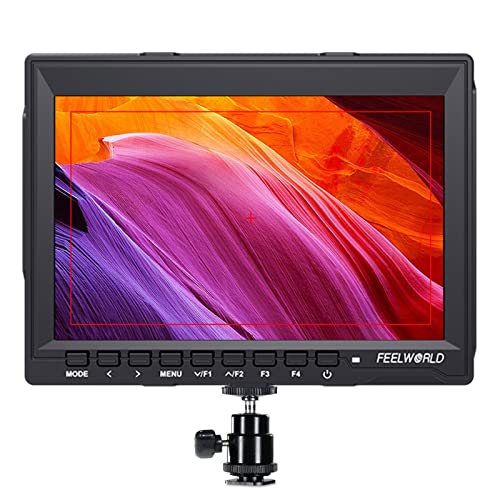
Features: 1280×800 high-definition IPS display, wide color gamut, 400 cd/m2 brightness for accurate color and clarity. Ultra-slim at 17 mm thickness and 300 g weight, ideal for stabilizers and gimbals. Supports 4K HDMI and AV input with 4K UHD 3840×2160p(30/29.97/25/24/23.98Hz) and 4096×2160p(24Hz) formats.
Best for: On-camera professionals needing a compact, portable monitor with reliable color fidelity and a 4K-capable HDMI input. It’s suitable for run-and-gun shoots where weight and space are at a premium.
Why chosen: The FW759 offers a balance of portability and essential monitoring tools without overbuilding the setup. Its 4K HDMI support helps with accurate framing on modern cameras. A useful caution: make sure your rig can accommodate a slim 17 mm monitor on the chosen mount, as very compact rigs may require compatibility checks.
NEEWER F700 7″ Camera Field Monitor

Features: 7″ IPS touch screen with 1920×1080 resolution, 2000 nit brightness, and 1000:1 contrast. Includes 4K HDMI loop in/out, 3.5 mm headphone jack, and 15 preloaded 3D LUTs with up to 60 user LUTs. Offers comprehensive scopes and waveform tools for advanced exposure control. Firmware upgrades via SD card are supported.
Best for: Outdoor shoots and professionals who need bright, detailed monitoring plus LUT workflows. The loop-through HDMI helps founders integrate with multiple cameras and rigs.
Why chosen: High brightness and strong LUT capabilities make this monitor a versatile pick for harsh lighting. Limitation: headphones not included, so audio monitoring requires an external path if needed during shoots.
JINSWY 10.1″ Security Monitor

Features: 1024×600 resolution, 16:9 aspect, 300 cd/m² brightness, 500:1 contrast. HDMI, VGA, BNC, AV, and USB inputs provide broad compatibility with cameras, PCs, Raspberry Pi, and CCTV systems. Portable with a durable shell and built-in speakers, plus remote control.
Best for: Mixed-input environments where a single display can serve as a small reference screen or security-style monitoring. Choose this if you commonly switch between devices and need flexible inputs.
Why chosen: The wide input options make it a versatile companion for education, surveillance, and light videography. Caution: larger screen may be less ideal for tight on-camera rigs where space matters.
FEELWORLD S55 V3 6 Inch Field Monitor

Features: 6-inch Full HD IPS display at 1920×1080, 450 nit brightness, 3D LUT support, waveform, vectorscope, RGB histogram, focus assist, and exposure tools. Includes a sun hood to boost outdoor visibility. Built for on-camera use with a compact form factor.
Best for: Indoor studios and outdoor shoots where precise exposure and focus are critical, plus a need for external LUT previews in real-time. Caution: smaller screen size than some field monitors may limit detailed composition for complex shots.
Why chosen: The S55 V3 provides robust professional monitoring tools in a compact design, balancing image quality and portability for run-and-gun crews.
NEEWER F100 7″ Camera Field Monitor
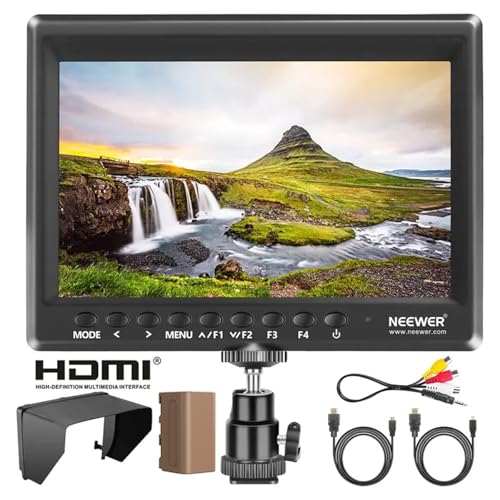
Features: 7″ external monitor with 1280×800 IPS, 450 nit brightness, and 3D LUT support. Includes Peaking Focus Assist, Check Field, Pixel to Pixel, Center Marker, Safe Frames, and Histogram. Compatible with 1080p and 4K HDMI inputs; powered by a 4400mAh F750 battery for extended use.
Best for: Independent filmmakers and videographers using handheld rigs or handheld stabilizers who need reliable exposure tools and battery-powered operation on location.
Why chosen: The F100 provides a solid feature set at a portable size with long battery life. Limitation: may require additional equipment to manage power and mounting on smaller rigs.
Buying Guide
What screen size and brightness do I need?
Smaller monitors (5–7 inches) are light and portable, ideal for on-camera use with minimal bulk. Larger displays (9–12 inches) offer more detailed scopes and easier monitoring for complex shoots, but add weight. Brightness matters for outdoor shoots; 1000–2000 nit displays excel in daylight, while 400–450 nit is sufficient for shaded or indoor environments.
Which features matter most for professional work?
Key features include waveform, histogram, vectorscope, peaking, false color, and 3D LUT support. These tools help ensure correct exposure, focus, and color grading in real time, reducing reshoots. Loop-through HDMI is useful for mirroring signals to multiple devices.
What about power and mounting?
Battery-powered monitors enable location shoots without mains power. Check battery type (e.g., F750), runtime, and whether the battery is included. Ensure the monitor fits your rig with a compatible mount, cage, or shoe attachment to avoid balance issues.
Is LUT support important for my workflow?
Yes for color-critical shoots. LUTs allow on-set preview of the intended look and can save time in post-production. Some models include multiple built-in LUTs and support custom uploads, which can streamline your color pipeline.
Which option suits a budget-conscious setup?
Compact 5–7 inch monitors with essential tools and decent brightness are typically the most cost-effective. If your work requires more advanced scopes and LUTs, consider mid-range 7–10 inch models with broader feature sets.
What about durability and outdoor visibility?
Monitors with sun hoods, anti-glare coatings, and weather-resistant shells perform better outdoors. A sun hood reduces glare and improves visibility on sunny shoots, which is widely recommended for field work.
FAQ
- What is a video monitor for camera used for?
External displays provide accurate framing, exposure, and focus tools beyond what a camera’s built-in screen offers.
- Do these monitors support 4K cameras?
Many listed monitors support 4K HDMI input, enabling clear previews from 4K cameras even when recording in HD or 4K, depending on the camera’s output.
- Will a brighter monitor help in daylight?
Yes. Higher nit brightness improves visibility in bright outdoor conditions, reducing glare and making critical details easier to monitor.
- Is LUT monitoring essential for video production?
For many professionals, LUTs help preview the intended color grade on set, saving time in post and reducing reshoots.
- Can I power these monitors with standard batteries?
Some models include compatible batteries (like 4400 mAh packs) or USB power options. Check compatibility and runtime for your rig.