Best Video Capture Cards for Streaming and Gaming
If you’re looking to turn live gameplay, camera feeds, or screen recordings into polished streams, a USB 3.0/Type-C capture card is essential. This guide compares five top options to help you pick the right one for your setup, whether you’re a casual gamer, a content creator, or a professional streamer. Each product is evaluated on input resolution, latency, compatibility, and ease of use.
Summary of chosen products
| Product | Best For | Key Benefit |
|---|---|---|
| Elgato Cam Link 4K | Pro quality cams and cameras | 1080p60 or 4K30/4K60 with broad compatibility |
| UGREEN 2K/1080p Capture Card | Multi-device streaming | USB-A and USB-C, 2K30/1080p60 output |
| Acer Video Capture Card | Budget-friendly streaming | 1080p60 with USB 3.0 and wide compatibility |
| Rybozen Capture Card | PS/Xbox to PC streaming | 1080p60, 1080p input, Plug-and-Play |
| XIIXMASK Video Capture Card | Flexible home studio | 4K loop-out, 1080p60/2K30, mic-in support |
Elgato Cam Link 4K – External Capture Card

Best for converting a DSLR or mirrorless camera into a webcam with high fidelity. The Cam Link 4K supports 1080p60 or 4K30/4K60 streams, making it ideal for professional livestreams, Zoom or OBS sessions, and creative recording. It’s a simple plug-and-play solution with broad software compatibility.
Who it’s best for: creators who own a high-quality camera and want a robust, reliable webcam replacement. Why chosen: top-tier image quality and seamless OBS/Zoom integration. Caution: requires a compatible camera and may demand USB bandwidth on busy systems.
UGREEN 2K@30Hz / 1080P 60FPS Capture Card

Better for multi-device setups thanks to both USB-A and USB-C connections and dual resolution options. It supports 4K input at 30Hz with 2K30/1080p60 output, offering flexibility for Switch, PS4/PS5, PC, and camera sources. Latency is kept low for smooth streams and recordings.
Who it’s best for: streamers who need compatibility across devices and both USB interfaces. Why chosen: broad compatibility and practical dual-port design. Caution: 2K output requires a source that supports 2K resolution; not all devices push 2K at 30Hz.
Acer Video Capture Card – 1080P 60FPS
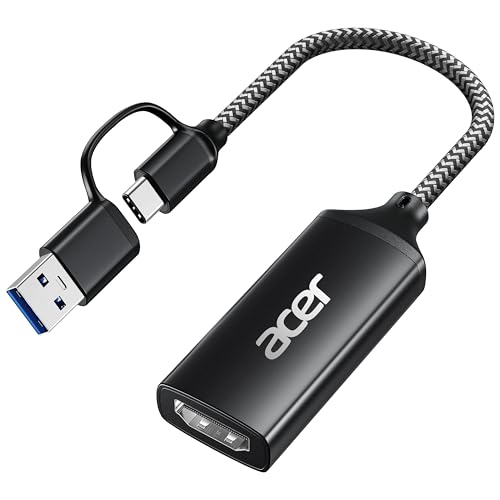
This budget-friendly option delivers reliable 1080p60 streams with USB 3.0 connectivity. It’s designed for easy plug-and-play operation and broad compatibility with Windows, Mac, and various consoles. Ideal for gamers who want solid performance without extra bells and whistles.
Who it’s best for: budget-conscious streamers or hobbyists who need dependable 1080p60 capture. Why chosen: straightforward setup and wide system compatibility. Caution: video quality scales with source resolution; not the top choice for 4K streaming.
Rybozen Capture Card – 1080P 60FPS

Simple, Plug-and-Play capture for streaming with a direct 1080p input and 1080p output. Works well with camera setups, consoles, and PCs, suitable for gamers and vloggers who value quick setup and reliable performance.
Who it’s best for: YouTubers and streamers who want a no-fuss, go-to capture card. Why chosen: reliable 1080p workflow and broad device compatibility. Caution: does not advertise high-end 4K capture; plan for 1080p streaming if your source is 4K.
XIIXMASK Video Capture Card – 4K Loop-Out

Designed for flexible home studios, this card supports 4K loop-out and up to 4K60 input, while delivering 1080p60 or 2K30 to the computer. It also offers mic-in for commentary, which simplifies adding voiceovers during streams or recordings.
Who it’s best for: creators needing multi-output capabilities and onboard audio input. Why chosen: 4K loop-out plus mic-in support. Caution: 4K loop-out requires compatible monitors or capture software to realize full 4K loop.
VIXLW Video Capture Card – 4K USB3.0 to USB-C

Offers 4K HDMI input with 2K@30Hz/1080p60 output and supports USB-C connections. It emphasizes ultra-low latency and compact design, ideal for portable streaming setups and on-the-go recording. It maintains broad device support across Windows and Mac.
Who it’s best for: mobile streamers and compact studio setups. Why chosen: strong low-latency performance and USB-C convenience. Caution: 4K input may require capable sources and software configuration for best results.
Buying Guide
What should you look for in a video capture card?
Key factors include input resolution, output resolution, frame rate, latency, and interface. If you primarily stream in 1080p, prioritize cards that offer stable 1080p60 with low latency. For 4K enthusiasts, confirm 4K input at 30Hz or 60Hz and a reliable USB connection.
Which connection type is best for your setup?
USB-A is common and widely compatible, while USB-C can offer higher throughput and smaller form factors. If you use laptops or mobile devices, USB-C capture cards can simplify cables and ports. Some models offer both USB-A and USB-C for maximum versatility.
Should you consider mic-in or audio features?
Some cards include a 3.5mm mic-in or embedded audio capture, which is useful for commentary without separate mixers. If you rely on external audio, verify compatibility with your headset or microphone and ensure the software can route audio correctly.
What about latency and heat management?
Low latency is crucial for interactive streaming. Cards made from aluminum or with good heat dissipation help maintain performance during long sessions. If you notice stuttering, check USB bandwidth, system load, and whether the capture card supports hardware acceleration with your software.
Compatibility considerations
Ensure your computer’s operating system and your streaming software (OBS, Zoom, Discord, etc.) are supported. If you use a game console or camera, confirm the device’s HDMI output is compatible with the capture card’s input specifications. Some cards are designed primarily for Windows or macOS and may need drivers or updates for full functionality.
FAQ
- Do capture cards require drivers?
- Is 4K capture worth it for streaming?
- Can I use a capture card with a phone or tablet?
- What is latency in a capture card?
- Can I record and stream at the same time?
- Is USB 3.0 necessary?
Most plug-and-play models work without extra drivers, but some may benefit from optional software or drivers for enhanced settings.
4K capture can improve future-proofing and post-production flexibility, but many streams are rendered at 1080p60 for bandwidth and performance reasons.
Some cards support USB-C connections and compatible apps; verify device compatibility before purchase.
Latency is the delay between the source signal and the captured output. Lower latency improves real-time interactions during streams.
Most capture cards support simultaneous recording and streaming, depending on software configuration and PC performance.
USB 3.0 (or higher) is recommended for stable high-bandwidth video transfer and low latency.