Best USB 3.0 Video Cameras for Clear, Plug-and-Play Streaming and Capture
When shopping for a USB 3.0 video camera, aim for models that offer reliable UVC compatibility, strong image processing, and easy setup across Windows, macOS, Linux, and single-board computers. The best choices below are aimed at streamers, educators, developers, and industrial users who need crisp video, flexible resolutions, and straightforward plug‑and‑play operation. Each pick is evaluated for who it’s best for, why it stands out, and any practical limitations to consider.
Summary of chosen products:
- innomaker USB 3.0 UVC Camera Module — Best for developers and robotics projects requiring 4K at 30FPS and 1080P at 60FPS with broad OS support.
- Arducam USB 3.0 Camera Module — Best for high-detail capture and programmable frame rates with a metal case and ISP features.
- IFWATER USB Camera 16 MP — Best for industrial or research use needing high resolution and a versatile 5-50mm manual varifocal lens.
- TRAUSI 1080P USB Webcam — Best for everyday video calls, streaming, and online teaching with auto light correction and a noise-canceling mic.
- Guermok Video Capture Card — Best for converting HDMI sources to USB 3.0 for streaming and recording with low latency.
innomaker USB 3.0 UVC Camera Module
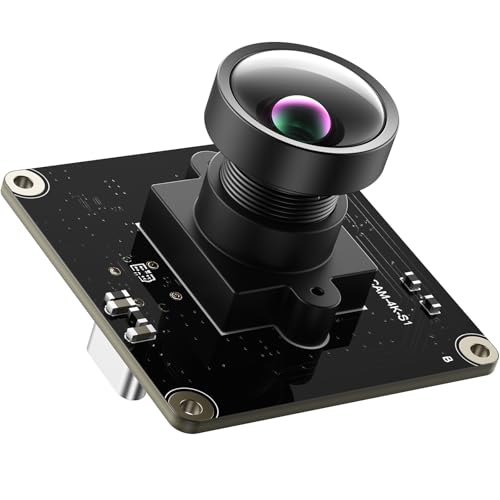
This camera module uses a USB 3.0 high-speed interface with an integrated ISP to deliver enhanced exposure and image quality for streaming and machine vision. Best for developers, robotics, and lab setups that require reliable 4K at 30FPS and 1080P at 60FPS, plus native UVC driver support for quick setup on Windows, macOS, Linux, Android, Raspberry Pi, and ARM boards. It supports YUY2 and MJPEG formats with multiple resolutions for conferencing and industrial applications. Limitations may include the need for compatible drivers or software for advanced features on certain platforms.
Guermok Video Capture Card

This HDMI-to-USB 3.0 capture card supports up to 4K input at 30Hz and outputs up to 2K/30Hz or 1080p60, ideal for streaming, online meetings, and recording with devices like laptops, consoles, or cameras. It’s a strong choice for users who need plug-and-play operation without drivers. Better for live gaming, teaching, and content creation. One caveat: capture cards are for capturing HDMI sources; not a direct display capture solution, and requires compatible capture software.
Kitchbai 4K USB Document Camera

This document camera is designed for teachers and presenters, featuring an 8MP sensor, A3-size capture, dual microphones, and a foldable, portable design. It supports Windows, macOS, and Chrome OS, with adjustable brightness and a reversible image option for flexible demonstrations. Best for classrooms and live demos, but users should verify compatibility with their specific video conferencing software and ensure the doc camera’s field of view meets their needs.
Capture Card Nintendo Switch by Rybozen

This 1080P HD capture card supports 1080P60 recording and streaming from HDMI sources, with USB 3.0 for quick transfer. It’s suitable for gamers and streamers who need reliable capture from consoles or cameras. Choose this if your primary use case is console gameplay capture; avoid if you require 4K passthrough or ultra-low latency on professional broadcasting setups.
IFWATER USB Camera 16 MP

A high-resolution USB camera with a 1/2.8-inch IMX298 sensor, offering up to 4656 x 3496 resolution. It features a 5-50mm manual varifocal lens for flexible field of view and close-up work. Best for industrial, research, and educational applications that need precise focus control. It is UVC compliant and supports multiple platforms without extra drivers, but manual focus adjustments may require trial and error to achieve perfect focus for specific scenes.
Arducam USB 3.0 Camera Module

This Arducam USB 3.0 camera uses the IMX477P 12MP sensor with an 88° M12 manual focus lens in a durable metal housing. It supports high-resolution stills (up to 12MP) and up to 120fps at 720p in high-speed modes, with a built-in ISP for image enhancements. Best for professional videography, lab demonstrations, and projects requiring high frame-rate options. Note that higher resolutions may require more processing power and optimized software pipelines.
Buying Guide: USB 3.0 Video Cameras And Capture Solutions
What should you consider when selecting a USB 3.0 video camera?
- Resolution and frame rate: Decide between 4K for detail or 1080p for wide compatibility and lighter workloads. Consider whether you need 30fps, 60fps, or higher.
- Sensor and optics: Larger sensors and varifocal lenses offer better image quality and flexibility for close-ups or wide scenes. Manual focus may be preferred in controlled environments.
- Connectivity and compatibility: Look for UVC support and broad OS compatibility (Windows, macOS, Linux) plus single-board computers like Raspberry Pi or Jetson Nano.
- Latency and plug-and-play: For live streaming and conferencing, low latency and true plug-and-play operation are crucial. Some devices require software adjustments for optimal results.
- Form factor and use case: Document cameras and compact USB cameras suit classrooms and fieldwork; capture cards are ideal for video game streaming and HDMI-to-USB workflows.
- Infra settings and accessories: Built-in features like auto light correction, noise-canceling mics, and adjustable brightness can reduce post-processing time and help maintain consistent quality.
Common Scenarios And Recommendations
- Education and demonstrations: Choose Kitchbai or TRAUSI for reliable plug-and-play setup and clear visuals during live classes.
- Robotics and development projects: innomaker offers 4K at 30FPS and broad board compatibility, suitable for machine vision tasks.
- High-detail capture and experimentation: Arducam and IFWATER provide high resolution and versatile lenses for precise imaging needs.
- Live streaming from HDMI sources: Guermok capture cards provide low-latency HDMI-to-USB solutions for gaming or online teaching.
FAQ
- What does USB 3.0 mean for video cameras? It indicates a higher data transfer rate, enabling higher resolutions and smoother frame rates, especially for live streaming and real-time processing.
- Do these cameras require drivers? Many are UVC compliant and plug-and-play, but some advanced features may need software support on certain platforms.
- Is 4K necessary for my setup? If your display and software can handle it, 4K provides sharper detail; otherwise, 1080p is typically sufficient and more widely supported.
- Can I use these cameras with a Raspberry Pi or Jetson Nano? Yes, many models advertise compatibility with Raspberry Pi, Jetson Nano, and other ARM boards, often via native drivers.
- What’s the difference between a camera module and a capture card? A camera module captures video directly from a sensor; a capture card takes HDMI input and routes it to a computer via USB for streaming or recording.
- What are practical limitations to consider? Some cameras require manual adjustments for focus or brightness in certain lighting, and performance can depend on CPU/GPU resources and software configuration.