Best Turn Negatives Into Photos: Top Film to Digital Scanners for 2026
Turning cherished film negatives and slides into modern digital photos is easier than ever with dedicated film and slide scanners. The following hand-picked models are among the best for converting 35mm, 110, 126, Super 8 films, and slides into high-resolution digital images. Each option provides different viewing formats, storage options, and ease-of-use features, ensuring you can preserve memories without a computer or complex setup.
style=”display:none;”>Summary Table of Selected Products
| Product | Brand | Type | Output Quality | Key Benefit |
|---|---|---|---|---|
| Magnasonic All-in-One 24MP Film Scanner | Magnasonic | All-in-One Film/Slide Scanner | Up to 24MP | Large 5″ display and HDMI output |
| ClearClick QuickConvert 2.0 | ClearClick | Standalone Scanner | 14MP (22MP interpolated) | No computer required |
| Legacybox 3 Items | Legacybox | Media Transfer Service | Cloud/USB/DVD options | Professional digitization with included storage |
| Mobile Film Scanner 35mm | DigitConvert | Portable Scanner | Digital JPEGs from 35mm | Foldable, app-assisted scanning |
| ClearClick Virtuoso 3.0 | ClearClick | Film & Slide Scanner | Up to 22MP interpolated | 7″ LCD preview screen |
Magnasonic All-in-One 24MP Film Scanner Review

This all-in-one scanner handles 35mm, 110, 126, and Super 8 film, as well as 135/126/110 slides, turning negatives and slides into high-resolution digital JPEG files. It features a built-in 5-inch LCD for immediate viewing and an HDMI output option for larger displays (HDMI cable not included). A practical 128MB internal memory plus an SD card slot for up to 128GB makes it simple to save a lifetime of photos directly on the device or removable storage. This model emphasizes convenience for users who want quick, standalone scanning without a computer.
Key advantages include a broad film and slide compatibility, a generous display for on-device review, and flexible storage options. Image quality reaches up to 24MP, which is suitable for archiving memories with clear detail. The built-in memory and SD expansion help create a straightforward workflow, particularly for households preserving old family reels and photo albums.
ClearClick QuickConvert 2.0: No-Computer Photo Scanner

The ClearClick QuickConvert 2.0 provides a straightforward, standalone scanning experience for 4×6 photos and 35mm, 110, 126 film. It scans at 14 megapixels (22MP interpolated) and saves JPEGs on an SD card. A notable strength is its ultra-simple, no-driver setup—just power on and begin scanning. Although it scans one item at a time and lacks an auto-feeder, its compact design and quick operation (2-3 seconds per item) make it ideal for quick digitization of old prints and negatives without a PC.
Legacybox 3 Items: Digitize Old Media to Digital
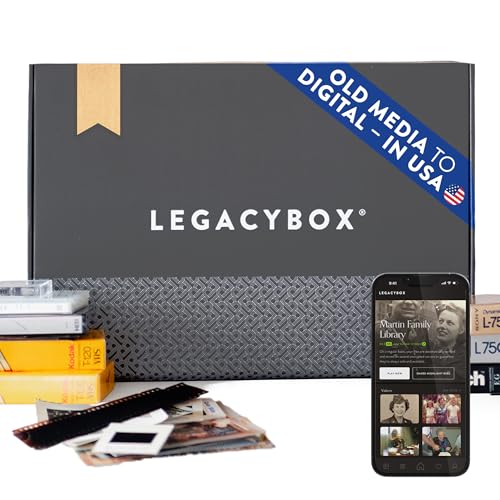
Legacybox offers a multi-item digitization service that covers VHS, film reels, slides, negatives, camcorder tapes, and audio cassettes, with cloud storage, USB, or DVD options. The kit includes prepaid shipping labels and a 1-month cloud subscription, plus a USB drive containing digitized files. Processing is performed by Legacybox’s Chattanooga, Tennessee facility, with items tracked and labeled during the workflow. This option suits users who prefer professional handling and a bundled data delivery package, even for items with wide format variety.
Mobile Film Scanner: 35mm Slides and Negatives on the Go
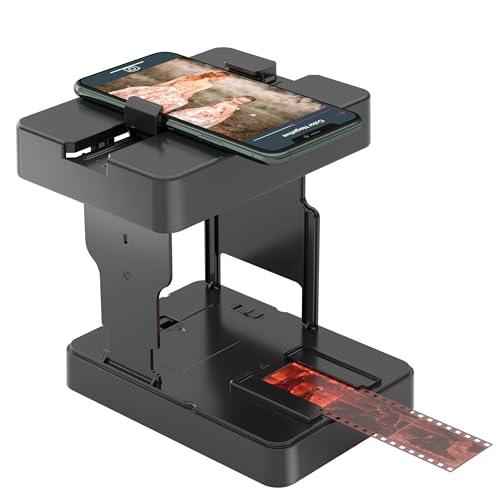
This portable scanner is designed for travelers and casual users who want to convert 35mm slides and 135 film negatives into digital JPEGs. Its foldable design makes it compact enough for a backpack, and the included app helps digitization on the go. The emphasis is on convenience and mobility rather than ultra-high resolution, making it a good choice for hobbyists who document trips or family events while away from a desktop setup.
Slide Viewer Light Box by Eyesen: Ultra-Thin for Quick Scans

The Eyesen Ultra-Thin Slide Viewer Light Box uses a bright, even LED backlight to illuminate slides and negatives for viewing and scanning. The device is slim, with a viewing area slightly larger than A4, and offers three brightness levels. A free companion app supports scanning and editing, making it easy to digitize and share images. The combination of a low-profile design with an integrated app makes this a practical tool for researchers, crafters, and families digitizing old media at home.
Eyesen Slide Viewer Light Box: Large, Ultra-Thin, Free App

This Eyesen model mirrors the ultra-thin design concept with a large viewing area and a free app for scanning and editing. It emphasizes compatibility with multiple media types, including slides, negatives, and photos, and aims to provide a simple workflow for digitizing archival media without a computer. The product highlights adjustable brightness and even lighting, which helps users capture images suitable for sharing or preserving digital copies of memories.
TCNEWCL Slide Viewer Magnetic Light Box

The TCNEWCL light pad is an ultra-thin, A4-sized option designed to scan many slides and negatives at once, using a phone app to capture, rotate, and filter images. It supports color and contrast adjustments and pairs with SlideScan and FilmBox apps for broader functionality. The three brightness levels offer flexible backlighting for various media types, making it a versatile tool for hobbyists and creative projects requiring quick digitization on the go.
ClearClick Virtuoso 3.0: Large 7″ LCD Preview

The ClearClick Virtuoso 3.0 is a high-resolution film and slide scanner with a large 7″ LCD preview screen. It supports 35mm, 110, and 126 negatives and slides, offering real-time viewing as you scan and saving files directly to an SD card (not included). Output can reach up to 22MP interpolated, delivering detailed digital images without a computer. The sizable display helps verify scans on-device, which is convenient for archiving and sharing family memories.
Buying Guide: Key Purchase Considerations for Film and Slide Scanners
- Media compatibility: Check which formats are supported (35mm, 110, 126, Super 8, slides, negatives) to ensure the device meets your archive needs.
- Resolution and output: Look for scanners offering at least 14-22MP native resolution, with interpolation options if you plan to print or enlarge images.
- Display and review: A built-in LCD can simplify review before saving. Larger screens (5″ to 7″) help spot flaws or color issues early.
- Storage options: Internal memory and SD card support determine how many items you can scan before transferring files to a computer or cloud.
- No-computer workflow: If you prefer stand-alone devices, ensure the model supports direct saving to SD cards or USB drives, and check for HDMI output if you want to view on a TV or larger monitor.
- App and software support: For portable scanners, a companion app can simplify scanning and editing on mobile devices; verify compatibility with your phone’s OS.
- Speed and ease of use: Scanning speed (per item or batch) and the presence of an auto-feeder influence your overall experience, especially for large archives.
- Physical design: Foldable or compact designs are ideal for travel or limited spaces, while larger, feature-rich models suit home studios.
- Processing time and service options: If you’re considering professional digitization (as with Legacybox), evaluate processing times, item limits, and delivery formats (cloud, USB, DVD).
- Cost of ownership: Factor in consumables (SD card capacity, replacement parts) and potential need for accessories like HDMI cables or adapters.