Best RCA to USB Video Solutions for Digitizing Vintage Footage
This guide highlights top RCA-to-USB devices to help you digitize old tapes and view or edit them on modern computers. The best picks serve different needs—from simple playback to more robust capture—so you can choose based on device compatibility, ease of use, and data reliability. Ideal buyers include hobbyists digitizing legacy VHS, families preserving memories, and semi-professional archivers seeking straightforward transfer paths.
| Product | Best For | Why It’s Selected |
|---|---|---|
| Video Capture Card, USB Video Capture Device by VIXLW | All-around digitizing project | Strong balance of ease-of-use, PAL/NTSC support, and PC/Mac compatibility for direct video capture |
| Hididi USB to RCA Cable 5FT | Direct playback on TVs and PCs | Simple cable solution for quick viewing of camcorder content without a capture card |
| FdcLixuvol USB to 2 RCA Adapter 1.5M | Two-channel audio capture | Compact USB-to-RCA adapter focused on stereo audio and basic video |
| Qulkws USB to 2 RCA Cable | Budget, quick-connect | Value-friendly option for basic AV connections to USB-enabled devices |
Video Capture Card From VIXLW: RCA To USB Converter

Best for: This device is best for users who want a straightforward RCA to USB capture workflow on a PC or Mac. It supports VHS, VCR, Hi8, DV, and similar sources, converting analog signals to a digital 720p USB stream. The product highlights include easy plug-and-play operation, no external power required, and automatic driver installation, making it ideal for first-time digitizers.
Why chosen: The card emphasizes “AV to USB” capture with audio, enabling direct digitization without a sound card. Its ability to handle PAL/NTSC signals broadens compatibility for diverse legacy media collections.
Limitation: The 720p output may be less suitable for projects requiring higher resolution color grading or professional post-production pipelines. Consider higher-bit options if that’s a priority.
Hididi USB to RCA Cable 5FT
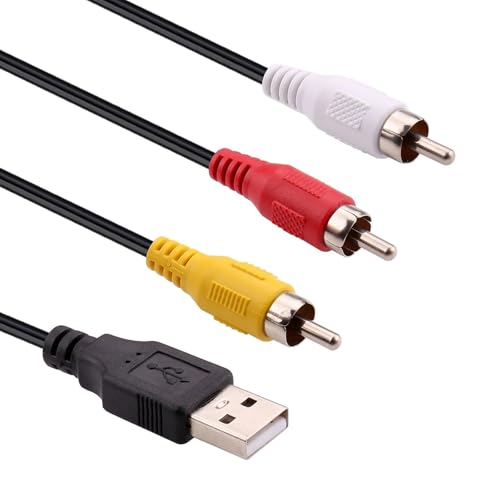
Best for: This USB 2.0 to RCA cable is best for quick, on-the-spot viewing of camcorder content on a TV or computer without a capture device. It’s a flexible option when you mainly want to view footage rather than archive it.
Why chosen: It targets those who own RCA-enabled camcorders and want an easy connection to modern displays. The flexible design helps in tight spaces or awkward setups.
Caution: It does not provide dedicated video capture or encoding; use this when you only need viewing or streaming rather than file creation.
FdcLixuvol USB to 2 RCA Adapter, 1.5M

Best for: This adapter is best for users who need two-channel stereo audio transfer from RCA devices to USB-enabled systems, with a simple, compact form factor suitable for portable digitization setups.
Why chosen: The product combines a USB A male connector with two RCA female connectors for left and right channels, using copper conductors for reliable signal transmission. It’s a practical choice when you want to avoid a full capture kit.
Limitation: It focuses on audio (RCA left/right) with standard USB interface and may require additional software or hardware if you need direct video capture or higher-quality video encoding.
Qulkws USB to 2 RCA Cable, 0.65FT

Best for: This compact cable is well-suited for quick, budget-friendly connections between AV equipment and USB-enabled devices. It’s a practical pick for simple playback or light editing tasks.
Why chosen: The cable emphasizes durable PVC construction and multi-functional signaling—connecting camcorders, DVD players, and set-top boxes to USB devices for viewing content. It’s particularly attractive when data transfer efficiency isn’t a critical requirement.
Limitation: This solution does not support data transfer beyond audio/video connectivity, so it’s not ideal for workflows that require direct, clean digital captures for archiving.
Buying Guide
Key considerations for selecting an RCA-to-USB setup include compatibility, intended use, and workflow simplicity. Here are practical questions to guide your choice:
- What is your primary goal: quick viewing or full digitization? If you want to preserve memories with editable files, a capture card (like the VIXLW option) is generally better than a passive cable.
- Do you need audio capture alongside video? Look for devices specifically advertising audio capture in sync with video output, especially if you’re digitizing tapes with sound.
- Which signal standards do you need to support? For mixed collections, ensure the device supports both PAL and NTSC formats.
- Is simplicity a priority? Plug-and-play devices with automatic driver installation reduce setup time, making them suitable for beginners.
- What is your editing and storage plan? Consider output resolution and whether your post-production workflow requires higher-than-720p capture.
- What is your hardware environment? If you’re using modern PCs or Macs, verify compatibility with your operating system and whether additional software is required.
Frequently Asked Questions
- Can these devices capture video directly to my PC? Yes, many USB capture cards provide direct capture to your computer, simplifying archiving and editing workflows.
- Do I need a power source for RCA-to-USB adapters? Most USB-to-RCA adapters are powered through the USB port and do not require an external power supply.
- Will these work with modern TVs? Some options allow viewing on a TV via USB connection, while capture-focused devices are designed for PC capture rather than TV playback.
- Is 720p enough for digitizing old tapes? For casual viewing and basic archiving, 720p often suffices, but higher resolution may be preferred for detailed restoration tasks.
- Are PAL and NTSC both supported? Many devices list PAL/NTSC compatibility, which is essential for tapes from different regions or devices.
- What about audio quality? Ensure the model specifies audio capture alongside video if your tapes contain important soundtracks.