Best PTZ Camera With Controller for Live Streaming and Worship
For church services, conferences, and live productions, a PTZ camera paired with a dedicated controller can simplify multi-camera workflows. This guide highlights five of the top PTZ camera bundles that couple powerful optical zoom, AI auto-tracking, and intuitive control interfaces. Each option supports professional streaming standards and multiple network protocols to fit various environments. Read on to compare capabilities and choose the setup that best fits your venue and production needs.
| Product | Key Features |
|---|---|
| Tenveo PTZ Camera and Controller Bundle | 20X optical zoom, AI humanoid & face auto-tracking, HDMI/USB3.0/LAN(PoE), 5″ LCD controller |
| FoMaKo PTZ Camera Bundle 20X | 20X optical zoom, AI auto-tracking Gen 3, PoE, LCD screen, bundle with KC608 controller |
| Prisual 30X Dual PTZ Camera System | Two 30X cameras, AI tracking, PTZ controller, VISCA/UDP/TCP/ONVIF, multi-camera control |
| AVKANS Pro PTZ Controller | 5-inch touch LCD, IP NDI camera control, PoE, multi-protocol support, 6 user keys |
| FoMaKo 30X Bundle with KC608 | 30X optical zoom, AI auto-tracking Gen 3, PoE, LCD, bundled with PTZ controller |
Tenveo PTZ Camera And Controller Bundle

The Tenveo bundle combines a 20X optical zoom PTZ camera with a dedicated 5-inch LCD joystick controller. The camera supports HDMI, USB 3.0, and LAN (PoE) for live streaming and remote control. It includes AI humanoid and face auto-tracking for precise framing, making it well suited for church worship, conferences, or education livestreams. The kit supports RTSP, RTMP, ONVIF, and other network protocols, enabling flexible integration with existing streaming workflows. Note: the system does not include an internal microphone, so external audio capture is required.
FoMaKo 20X PTZ Camera Bundle With Controller

FoMaKo’s 20X optical zoom PTZ camera bundle includes AI auto-tracking Gen 3 and a bundled KC608 controller. The camera supports HDMI, PoE, and multiple streams, making it suitable for church services, education, and events. Upgrade options include NDI, which can be added later. The Gen 3 AI tracking offers customizable modes and sensitivity to maintain subject framing, even during movement. A gear-driven design aims to improve preset accuracy and durability in busy production environments.
Prisual 30X Dual PTZ System With Controller
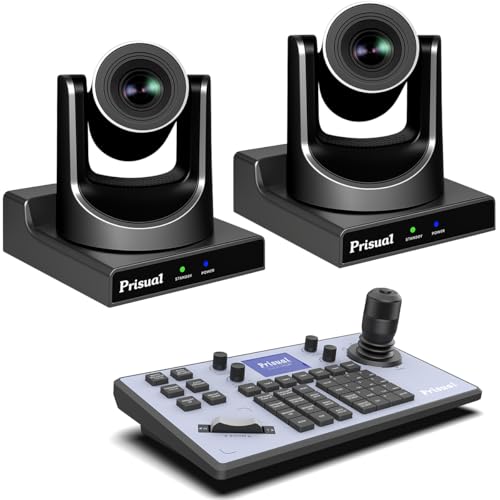
The Prisual dual-camera package is designed for multi-camera live production, enabling synchronized framing and transitions between wide and close-up shots. Each camera delivers 30X optical zoom, with a PTZ controller that consolidates control over IP streams. It supports VISCA UDP/TCP, ONVIF, and other protocols for unified management and easy integration into existing studios or worship spaces. The system is optimized for presenter tracking and zone-based tracking to match church or conference needs.
AVKANS Pro PTZ Controller With 5-Inch LCD

The AVKANS Pro PTZ Controller pairs with IP-based PTZ cameras and features a built-in 5-inch touch LCD preview. It supports multiple protocols including VISCA over IP, ONVIF, Pelco-D/P, and more, enabling broad compatibility with different camera brands. The device includes POE for simplified wiring and offers user-defined keys to speed common operations like presets and tracking, which is useful in houses of worship, education, and corporate events.
Prisual PTZ Controller With LCD And NDI Options

The Prisual PTZ Controller provides extended control for multi-camera setups, with a 4D joystick and LCD display to monitor and adjust live streams. Its design emphasizes compatibility with VISCA over IP, RS232/RS422, and RS485 protocol stacks, enabling easy integration into larger production lines. The controller supports up to 256 PTZ cameras with a 6-camera quick select feature and up to 255 presets, ideal for complex church services, conferences, and esports events that require rapid angle switching and precise framing.
Buying Guide: Key Purchase Considerations
When selecting a PTZ camera with a controller, consider the following factors to match your venue and production workflow:
- Optical Zoom and Image Quality: Higher zoom (20X–30X) helps maintain frame composition at longer distances, which is crucial in churches and auditoriums. Look for models with HD/Full HD or 4K outputs and low-light performance to ensure clear footage in diverse lighting.
- AI Auto-Tracking Capabilities: AI tracking can automate presenter framing, but review modes (presenter, zone, auto-frame) to ensure you get reliable tracking without constant adjustments.
- Control Interface: A dedicated PTZ controller with a joystick and LCD preview simplifies live operations. Confirm compatibility with your camera brand (VISCA, ONVIF, RS-232/422/485) and whether PoE is available for single-cable power and data.
- Protocols and Compatibility: Ensure support for VISCA over IP, ONVIF, RTSP/RTMP for streaming, and multi-camera integration with existing switchers or streaming software. NDI support can reduce latency in networked productions.
- Audio Integration: Many PTZ cameras do not include built-in mics. Plan for external audio capture and a mixer to coordinate audio with video for church services and events.
- Durability and Setup: Gear-driven versus belt-driven designs impact accuracy and longevity. A robust mount and reliable preset positioning help maintain consistency during long events.
- Networking and Power: PoE reduces cable count, but verify your network switch capacity and power budget. Consider remote location constraints and the availability of PoE in worship spaces or studios.
- Future-Proofing: NDI or IP-based upgrades, firmware updates, and compatibility with future streaming platforms can extend the life of your investment.
How to Use a PTZ Camera With Controller in a Live Setting
Plan camera placement to maximize coverage of the main stage and audience areas. Pre-program presets for key angles (wide, mid, close-up) and set up tracking profiles to automatically frame presenters. Run a brief rehearsal to confirm focus, exposure, and framing before a live event. During the broadcast, use the controller for rapid transitions and precise tweaks, freeing up the operator to monitor audio and graphics.
Comparative Considerations
For venues prioritizing automation and minimal operator load, AI-tracking with dual-camera systems can deliver consistent framing with less manual input. If you need flexibility across multiple rooms or campuses, a multi-camera controller that supports many devices and protocols will simplify management. For productions requiring ultra-low latency and network efficiency, NDI-enabled cameras and controllers can be advantageous. Always ensure your chosen system aligns with your existing gear, streaming platform, and staff expertise.