Best Mounts to Put a Camera Above a Monitor for Clear Streaming
Elevate your livestreaming or video conferencing setup with a dedicated above-monitor shelf mount. This guide highlights five reliable options that keep cameras, lights, and mics within easy reach while freeing desk space. Each choice fits standard VESA patterns and offers height adjustment for optimal framing. Read on to compare features, installation, and durability to find the best fit for your workflow.
| Product | Brand | Key Benefit |
|---|---|---|
| VIVO 16 inch Above/Behind VESA Monitor Livestream Device Shelf Mount | VIVO | Low-profile, supports multiple devices |
| 16 inch VESA Monitor Shelf For Streaming | WORLDLIFT | High weight capacity, versatile mounting |
| Stouchi Continuity Camera Mount | Stouchi | Mag-Safe compatibility for easy attachment |
| ErgoFocus DSLR Monitor Mount | ErgoFocus | 36-inch shelf with cable management and multiple slots |
| IFCASE Above/Behind Desk Monitor Shelf Mount | IFCASE | VESA compatible, clean cable routing |
VIVO Above/Behind Monitor Shelf
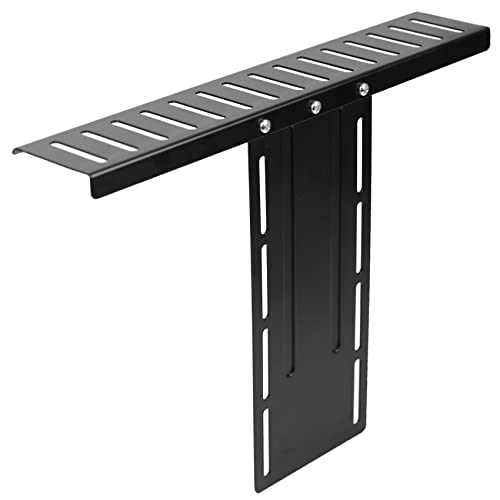
The VIVO shelf is a compact, all-in-one solution designed to sit above a monitor’s edge. It uses a low-profile 15.7” x 3.4” steel frame with a powder-coated finish and a 100mm VESA pattern, providing adjustable height for customized camera angles. Capable of holding up to 6.6 lbs, the shelf includes multiple slots suitable for cameras, webcams, mics, and lighting. Its universal design supports various devices while slipping neatly into tight spaces behind or above the screen.
16 Inch VESA Monitor Shelf For Streaming

The WORLDLIFT shelf is a 16-inch, high-capacity platform designed to position devices above the monitor. It fits 100×100 mm. With a robust 11 lb load limit, the T-structure offers stable support while maintaining a slim 3.4-inch depth. The shelf supports forward or backward mounting, enabling flexible placement of cameras, lights, and audio gear for a clutter-free desk setup. Height adjustment helps tailor the view for streaming, meetings, or tutorials.
Stouchi Continuity Camera Mount

The Stouchi continuity mount is a lightweight aluminum solution designed for iMac and most external displays. It supports Mag-Safe iPhone models for hands-free streaming and FaceTime, with easy magnetic attachment and adjustable tilt. While focusing on compatibility with Apple devices, the mount provides stable angles from vertical to 30 degrees downward, enabling reliable framing for video calls or live streaming without the need for bulky arms.
ErgoFocus Monitor Top Shelf

The ErgoFocus monitor shelf offers a dedicated top platform for DSLRs, webcams, mics, and lights. The design supports up to 11 lbs and includes a height-adjustable mechanism for personalized framing. It is built to replace clamp-tripod setups, freeing desk space and enabling devices to sit above or behind the monitor. The shelf’s universal slots accommodate many camera and lighting configurations, with included cable clips for tidy management.
IFCASE Above/Behind Desk Monitor Shelf

IFCASE offers an above/behind monitor shelf designed for quick installation on 75x75mm or 100x100mm VESA patterns. It enables easy elevation of DSLRs, webcams, or microphones above the screen, simplifying wiring with built-in cable routing. The sturdy construction supports a range of devices and keeps cables organized, contributing to a cleaner, more professional desk setup for video calls and streaming.
Buying Guide: Key Considerations For Above-M monitor Mounts
- VESA compatibility: Verify the pattern (75/100 mm) and ensure the mount clamps or brackets fit your monitor and devices.
- Weight capacity: Check the combined weight of camera, lights, and accessories to avoid overloading the shelf.
- Mounting orientation: Decide between above-the-monitor, behind-the-monitor, or dual configurations based on room layout and lighting needs.
- Adjustability: Look for height, tilt, and forward/backward adjustments to achieve optimal framing and eye level.
- Cable management: Prioritize shelves with integrated cable clips or channels to reduce clutter and keep cords secure.
- Installation effort: Some shelves require no tools, while others may need basic assembly or screws; consider your setup skills and time.
- Device compatibility: Ensure slots and 2.2” spacing accommodate your camera bodies, mics, and lights.
- Durability: Choose metal construction with powder coating for long-term stability and resistance to wear.
- Aesthetics: Pick a finish and design that complements your monitor and desk environment for a cohesive look.
Choosing the right above-monitor camera mount depends on your device mix, desk space, and how you want to control angles during calls or streams. The listed options balance compact design with sturdy construction, enabling cleaner backdrops and improved camera framing without a bulky arm system.