Best Mini Projector Tripod Stands for Home Theater Setups
Finding a stable, adjustable base for a compact projector can dramatically improve image alignment and viewing comfort. This guide highlights five top mini projector tripod stands designed to fit a wide range of compact projectors, cameras, and accessories. Each option emphasizes stability, easy setup, and flexible adjustment to help you tailor the throw angle and height for any space.
The following quick-reference table summarizes the featured products, including brand, notable features, and primary use cases. Use this as a starting point to compare options at a glance.
| Product | Brand | Key Features | Ideal For |
|---|---|---|---|
| SoeKoa Mini Projector Tripod Mount | SoeKoa | Three screw adapters, 360° rotation, 90° tilt | Most mini projectors with common screw sizes |
| JCWINY Mini Projector Stand (All Metal) | JCWINY | Metal build, 360° ball head, max 10″ height, 1/4″ screw compatibility | Desktop setups, webcams, small cameras |
| Decosis Projector Stand Tripod Adjustable | DECOSIS | Up to 46.5″ height, 15″ x 11″ top tray, 360° head, tilt up to 90° | Home, office, presentations |
| Coret Projector Tripod Stand | Coret | Portable, 46-100 cm height range, 360° head, 1/4″ screws | Travel, classrooms, live broadcasts |
| KPPTYTY Mini Projector Tripod Mount | KPPTYTY | 360° rotation, 90° tilt, compatible with most mini projectors | Versatile mini projector setups |
Below, five carefully chosen mini projector tripod stands are examined for build quality, adjustability, compatibility, and practicality in common spaces such as living rooms, classrooms, and small offices. Each section provides an objective overview to help you compare performance and fit for your needs.
SoeKoa Mini Projector Tripod Mount
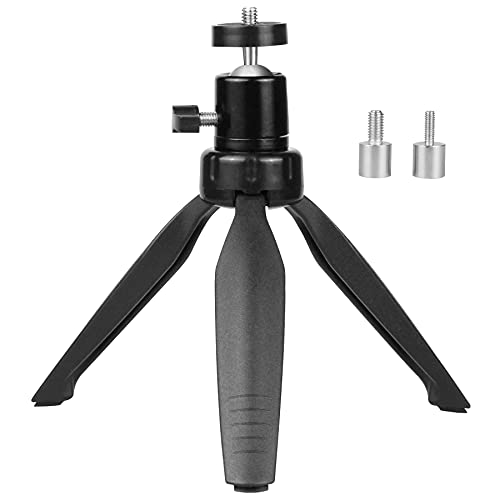
The SoeKoa mount is designed to fit a broad range of compact projectors with three screw adapters: 3.9 mm, 6 mm, and 6.35 mm. This versatility makes it suitable for many mini projectors from brands like DR.J, DBPOWER, Anker, AAXA, Artlii, LoongSon, and APEMAN. The mount offers a full 360-degree rotation and up to 90 degrees of tilt, enabling flexible alignment for various throw distances and screen positions. Its compact profile makes it a good choice for desktop setups or ceiling- or shelf-mounted configurations where space is limited. The build emphasizes stability with secure screw connections, reducing the risk of misalignment during use.
JCWINY Mini Projector Stand, All Metal

The JCWINY stand features a rugged all-metal construction with durable ABS components and non-slip rubber pads for stability on tabletops. It supports most mini projectors and other equipment with a 1/4-inch mounting screw hole, including webcams and small cameras. A compact table-top height up to 10 inches provides easy placement for desk setups, while the 360-degree ball head rotation and up to 90-degree tilt allow precise viewing angles. The included smartphone holder clip broadens its use, enabling quick setups for mobile content streaming and quick classroom demonstrations.
Decosis Projector Stand Tripod Adjustable
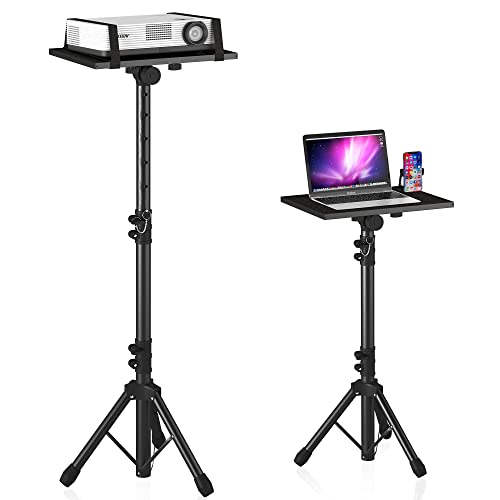
The DECOSIS stand provides a sturdy platform for home theaters and professional settings. It features an adjustable height range from about 23.5 inches to 46.5 inches, making it adaptable for seating distances and ceiling placement. The top tray is enlarged (approximately 15″ x 11″), capable of accommodating various devices such as projectors, laptops, and DJ equipment. A 360-degree rotating head enables precise alignment, while a tilt capability of up to 90 degrees ensures optimal screen positioning. The frame is designed for quick assembly without tools, and its solid construction aims to minimize wobble during use.
Coret Projector Tripod Stand

The Coret tripod stands out for portability and ease of use. Weighing about 1.1 pounds, it folds down for travel and quick setup. Height is adjustable from 46 cm to 100 cm (roughly 18 to 39 inches), with three sturdy legs to maximize stability. The 360-degree rotatable head and standard 1/4-inch screw compatibility enable flexible projection angles and compatibility with most mini projectors, cameras, and webcams. This model is well-suited for classroom demonstrations, on-the-go presentations, and live streaming events where quick deployment matters.
KPPTYTY Mini Projector Tripod Mount

The KPPTYTY mount is designed for broad compatibility with many mini projectors, including popular brands like Anker, DR.J Upgrade, DBPOWER, AAXA, Artlii, LoongSon, and APEMAN. It features a 6 mm screw adapter and supports 360-degree rotation along with a 90-degree tilt, offering flexible alignment for various room layouts and screen placements. It is aimed at users seeking a straightforward, reliable mounting solution that can adapt to multiple projector models without special tools or complex assembly.
Buying Guide: Key Considerations for Mini Projector Tripod Stands
When selecting a mini projector tripod stand, consider the following factors to ensure a good fit for your space and equipment:
- Compatibility: Check the mounting screw size (1/4 inch is standard) and ensure the stand can accommodate your projector’s weight and dimensions. Some models offer multiple screw adapters for broader compatibility.
- Height and reach: Determine the maximum and minimum height needed for your seating arrangement and ceiling height. A taller stand is helpful for ceiling projection, while a compact desk stand works for laptop-based presentations.
- Rotation and tilt: A 360-degree rotation and a tilt range of up to 90 degrees provide flexibility for different throw distances and screen orientations. Verify whether the tilt is positive, negative, or both.
- Stability: Look for a sturdy base, non-slip feet, and a well-balanced center of gravity. Travel-friendly models should still offer solid stability when extended.
- Portability: If you plan to move between rooms or locations, consider weight, foldability, and ease of setup. Lightweight stands are convenient for travel, but ensure they don’t compromise stability.
- Material and build quality: Metal constructions generally offer greater durability and stability than lightweight plastics. ABS components can provide a good balance of weight and strength.
- Accessory compatibility: Some stands include or support accessories like smartphone holders, webcam mounts, or laptop trays. Assess whether these extras align with your typical use cases.
- Setup and maintenance: Look for tool-free assembly and clear instructions. Quick-release mechanisms or twist-to-lock designs simplify ongoing use and storage.
In choosing among these options, consider your space, usage patterns, and the desired balance between portability and stability. For classroom or presentation settings, taller, robust stands with broad top trays and quick assembly tend to perform best. For home theater or casual use, compact, easily adjustable stands with reliable rotation can deliver comfortable viewing angles without requiring a large footprint.