Best Mini DV Camcorder Cables and Adapters for Modern Setups
Looking for the right cable to connect a mini DV camcorder to a computer, TV, or other devices? This guide highlights five well-suited options and explains who each is best for. Whether you need USB to FireWire adapters, AV cables for quick playback, or a simple USB charging/transfer solution, these picks address common compatibility needs. The table below summarizes the key products for quick comparison.
| Product | Type | Best For | |
|---|---|---|---|
| USB 2.0 to IEEE 1394 Mini 4Pin FireWire DV Cable | FireWire/USB adapter | Older Sony DV camcorders | Limited to 4-pin FireWire devices |
| LBSC USB Male to IEEE 1394 4Pin | FireWire to USB adapter | Sony DCR-TRV75E users | Compatibility focused on a specific model |
| Eanetf 3.5mm to RCA Camcorder AV Cable | AV output cable | Connecting camcorders to TVs/AV gear | Audio/video via RCA; not for data transfer |
| LEAGY AV Cable 5 Feet | AV/10-pin Handycam cable | Handycam models with 10-pin output | May require TV compatibility checks |
| LBSC USB 2.0 to IEEE 1394 4Pin Adapter (6ft) | USB/FireWire adapter | Camera-to-USB transfer setups | Does not support reverse data movement |
USB 2.0 to IEEE 1394 Mini 4Pin FireWire DV Cable

This USB 2.0 to IEEE 1394 Mini 4-pin FireWire DV Cable connects your camcorder to a USB port for data transfer speeds up to 480 Mbps. It features a Mini 4-pin FireWire (IEEE 1394) connector on one end and a USB 2.0 connector on the other. Best for older Sony DV cameras and setups that require a simple bridge between USB hosts and FireWire devices. Caution: limited to 4-pin FireWire devices; not a universal FireWire 6-pin solution.
LBSC USB Male to IEEE 1394 4Pin Male iLink Mini DV Firewire Adapter Cord

Designed for the Sony DCR-TRV75E DV model, this USB-to-FireWire mini 4-pin data cable enables USB interfaces to work with Firewire devices. It supports IEEE 1394 transfer rates of 100/200/400 Mbps and is fully compatible with FireWire/iLink setups. Best for Sony camcorders that require a device-specific bridge. Limitation: compatibility is heavily model-focused and may not work with other cameras.
Eanetf 3.5mm to RCA Camcorder AV Output Cable

This AV output cable provides 3 RCA connectors for video and audio transmission from camcorders with RCA jacks. It’s ideal for connecting to TVs, home theater systems, or projectors. Best for users who want to view camcorder footage on a larger screen without data transfer. Limitation: does not carry data, only AV signals.
LEAGY AV Cable 5 Feet for Sony Handycam Mini DV

Designed for Handycam camcorders with 10-pin output, this cable provides RCA and S-Video connectors for easy connection to TVs and VCRs. Best for users who want a straightforward option to display footage on traditional displays. Caution: availability depends on camera’s 10-pin compatibility.
LBSC USB 2.0 to IEEE 1394 4Pin Adapter Convertor Cable

This 4-pin FireWire 400 output to USB input cable is aimed at connecting a camera to a USB interface for viewing. It notes that there is no capture functionality and supports IEEE 1394 transfer rates of 100/200/400 Mbps. Best for video viewing setups, not for file transfer. Limitation: no data capture or transfer from camera to computer.
PASOW Firewire Cable 4 Pin to 6 Pin iLink DV Cable
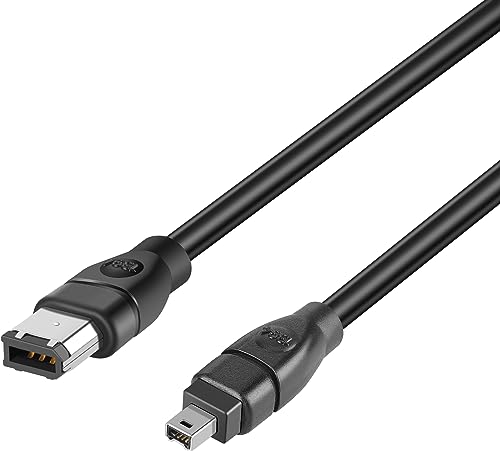
This Firewire cable connects 4-pin DV devices to 6-pin ports, enabling compatible cameras and devices to interface with computers or capture hardware at up to 400 Mbps. Best for users needing a bridge between 4-pin camcorders and 6-pin interfaces. Limitation: requires devices with compatible FireWire ports on both ends.
Buying Guide
What should you consider when selecting mini DV cables and adapters? First, confirm your camcorder’s output type (USB, FireWire/IEEE 1394, or AV) and the receiving device. If you need data transfer to a computer, USB-to-FireWire adapters or direct USB cables can be essential. For viewing on a TV, AV cables with RCA or S-Video connectors are reliable. Pay attention to pin counts (4-pin vs 6-pin) and whether the setup supports data transfer, viewing only, or both. In mixed environments, a single product that can bridge multiple interfaces reduces clutter and confusion.
- Best for specific camera models: Some adapters are model-specific and optimize compatibility with those devices.
- Data transfer vs. viewing: Distinguish between cables that move files and those that only relay audio/video.
- Cable length: Longer cables add flexibility but may impact signal quality for high-speed transfers.
- Connector compatibility: Ensure the end connectors match both your camcorder and your display or computer.
Frequently Asked Questions
- Can I transfer video from a mini DV camcorder directly to a computer with these cables?
Some adapters support data transfer (USB to FireWire) at limited speeds, but many cables are designed for viewing or simple connections. Always check the data capabilities listed by the manufacturer. - What is the difference between 4-pin and 6-pin FireWire cables?
4-pin FireWire provides powerless data transfer to smaller camcorders, while 6-pin supports higher power and broader device compatibility, including some capture devices. - Will AV cables work with all televisions?
AV cables use RCA or S-Video connectors and are generally compatible with most TVs that have corresponding inputs. Always verify input availability on the display. - Are there any limitations to using USB adapters for FireWire DV cameras?
Some adapters do not support bidirectional data transfer or file capture. They may only enable viewing or limited data transfer depending on device support. - Do any of these cables work with modern cameras?
Most options are tailored for older mini DV and DV-era cameras. Newer models may require different interfaces or proprietary adapters. - Is longer cable always better?
No. While longer cables offer flexibility, signal integrity can degrade at high data rates. Choose the shortest cable that fits your setup when possible.