Best Medium Format Film Scanning Solutions for Preserving Memories
Answering the need for reliable medium format film scanning, this guide compares five popular options. Best for hobbyists, multimedia creators, and archival projects, these devices range from mobile digitizers to stand-alone scanners. Each choice highlights ease of use, compatibility, and image quality to help you decide which setup fits your workflow and gear. Keep in mind that some solutions rely on smartphone apps or cameras to capture the scans.
Summary table of selected products
| Product | Format Support | Best For | |
|---|---|---|---|
| JJC Mobile Film Scanner | 35mm, 120 | Smartphone-based digitizing on the go | Detachable remote included |
| Lomography DigitaLIZA Max | 35mm, 120, 110, 127 | Multi-format versatile scanning | Built-in backlight options |
| Galaet 22MP Film Scanner | 35mm, 120 (multiple subformats) | High-resolution archival scans | Internal memory and SD card option |
| JJC Negative Film Digitizer (35mm/120) | 35mm, 120 | Camera-based digitizing with backlight | Slide rail for focusing |
| JJC Slide & Film Digitizer | 35mm slides, negatives | Macro-lens compatible digitizing | Includes multiple lens adapters |
JJC Mobile Film Scanner Converts 35mm & 120

Best for: Smartphone users who want fast, on-the-go digitizing of 35mm and 120 negatives. The device uses a detachable wireless remote and a magnetic backlight panel for adjustable illumination. It does not pack built-in editing software, so you’ll likely export to a photo app for processing. Caution: Ensure your phone size falls within the 2.2–3.5 inch clamp range for secure mounting.
JJC Negative Film Holder Mounts for 120
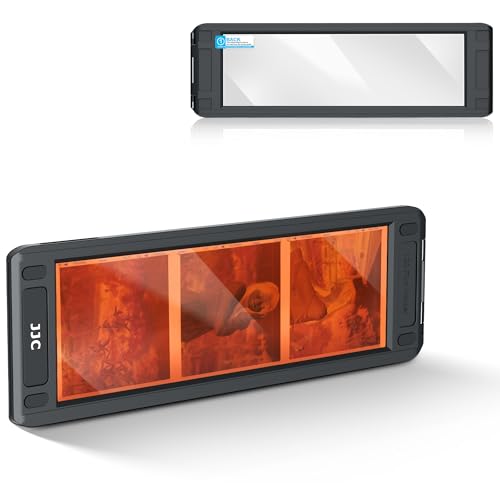
Best for: Scanning 120 film strips with stability. This holder clamps three negatives in a strip and works well with JJC FDA-S2 or standard flatbed scanners. It’s simple to use straight from the package. Caution: Avoid catching fingers in moving parts while closing the holder.
Lomography DigitaLIZA Max Film Scanner

Best for: Multi-format scanning with built-in backlight, compatible with smartphones or digital cameras. It supports 35mm and 120 formats and can handle 110 and 127 negatives via special compatibility. Caution: Battery or backlight power options may affect mobility depending on your setup; ensure power sources are available.
JJC Negative Film Digitizer for 35mm & 120

Best for: Users who want to convert old 35mm and 120 film using a camera, with a slide rail for precise focusing and a brightness-adjustable backlight. It supports macro-style captures with camera setups. Caution: Not recommended for 35mm slides; data mentions slides are excluded from this model’s use.
JJC Photo Slide and Film Digitizer
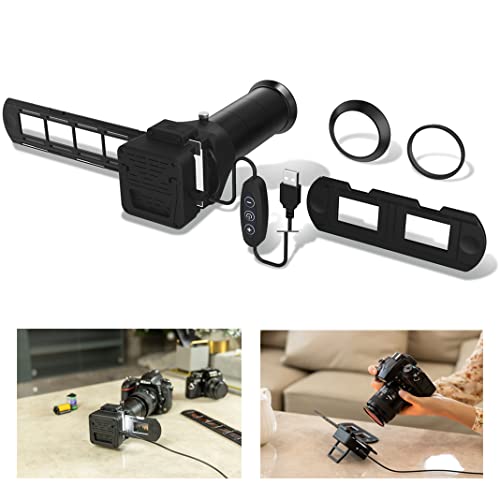
Best for: Re-photographing 35mm negatives and slides with select macro lenses. It includes seven lens adapters to fit Canon, Nikon, and Sony macro lenses, and a 6500K/CRI 95+ LED backlight. Caution: Incandescent lighting should be avoided at close distances to protect film integrity.
Buying Guide: How to Choose Your Medium Format Film Scanner
What format will you scan most often?
Choose a device that explicitly supports your primary formats. If you predominantly scan 35mm and 120, prioritize scanners with those holders. For archival work, aim for higher resolution and accurate color rendition.
Do you prefer a stand-alone scanner or a smartphone-based setup?
Stand-alone models offer greater flexibility with onboard memory and displays, while smartphone-based options are portable and budget-friendly. Consider whether you’ll scan on-location or only in a studio.
How important is backlighting and illumination?
Consistent, high-CRI backlighting reduces moiré and ensures color accuracy. Some models include built-in backlights; others require external light sources. Choose based on your preferred workflow and room lighting.
What about ease of use and setup?
Look for minimal assembly, clearly marked alignment notches, and a simple process to load negatives. Holders that prevent shifting during scans improve consistency and speed.
Storage and workflow considerations
Some devices save directly to internal memory or SD cards, while others export via a connected app. If you manage large archives, a solution with robust local storage or simple export options is advantageous.
Compatibility and accessories
Check whether your camera or smartphone can be used with the device, and whether you need macro lenses, adapters, or extra batteries. Accessories like rails, macro lenses, and backlights enhance precision but add cost.
Practical tips for best results
- Use a stable surface and secure film holders to minimize blur.
- Calibrate exposure by testing a few frames before processing a large batch.
- When using backlights, avoid direct contact with the film to prevent damage.
FAQ
- What is the best option for someone new to film scanning?
- Do I need software to use these scanners?
- Can I scan both slides and negatives?
- Is higher megapixel always better for film scanning?
- What should I consider about longevity and maintenance?
- Are these scanners suitable for archival projects?
A smartphone-based or all-in-one unit with a simple loading process is often easiest to start with, then migrate to more advanced setups as skills grow.
Most mobile digitizers rely on a free app or in-device processing, but some models recommend external photo apps for editing and sharing.
Many devices handle negatives; some models include slide-specific adapters. Verify format compatibility before purchase.
Higher resolution helps preserve detail, but the overall quality also depends on the film’s condition, backlight quality, and scanning workflow.
Durable film holders and stable rails reduce wear. Clean lenses and backlights periodically to maintain imaging consistency.
Yes, especially models offering high resolution, robust backlighting, and precise alignment. For critical archival work, prioritize devices with high-fidelity color reproduction and consistent illumination.