Best Magnifying Cameras for Computer-Connected Workflows
Finding the right magnifying camera that connects smoothly to a computer can improve accuracy in detail-focused tasks like coin collecting, electronics inspection, or jewelry work. The following selection highlights five reliable options that deliver clear magnified images, straightforward setup, and solid compatibility with Windows, macOS, and mobile devices. Each product includes a quick overview of its strengths to help you compare features at a glance.
Summary of chosen products:
- SkyBasic Wireless Digital Microscope — WiFi or USB connection; 50x–1000x; 1080P/720P output
- PalliPartners LCD Digital Microscope — 4.3-inch LCD, 50x–1000x; built-in battery; on-device viewing
- T TAKMLY Wireless Digital Microscope — 50x–1000x; multi-platform compatibility; LED illumination
- Plugable USB Digital Microscope — 250x; flexible arm stand; USB/USB-C/Thunderbolt ready
- SkyBasic Macro Handheld Digital Microscope — 500x; 2-inch IPS display; simple one-click capture
SkyBasic Wireless Digital Microscope

The SkyBasic wireless handheld digital microscope provides flexible connectivity via WiFi to Android or iOS devices and can connect to Windows or Mac computers through USB. It supports 50x–1000x magnification and 1920×1080 image resolution with 8 built-in LEDs for improved illumination. A single button handles photo and video capture, simplifying quick documentation of subjects. The device ships with a 2MP CMOS sensor to deliver crisp imagery when used with the appropriate app on a phone or tablet.
Key considerations
Pros: Wireless convenience, broad compatibility, simple capture. Cons: USB transfer option depends on accessory availability; assembly and app compatibility may vary by device.
PalliPartners LCD Digital Microscope

This 4.3-inch LCD digital microscope combines a 50x–1000x magnification with a built-in 1080p/720p display, letting you view specimens directly on the device without a computer. It includes a 32GB microSD card for saving images and videos, plus a built-in rechargeable battery that supports several hours of portable use. The 2.0MP camera and adjustable focus allow precise observation of tiny details, making it suitable for education, hobbyists, and field work.
Key considerations
Pros: On-device viewing and recording, portable, no computer required. Cons: LCD screen may add bulk and lighting may need fine-tuning in bright environments.
T TAKMLY Wireless Digital Microscope
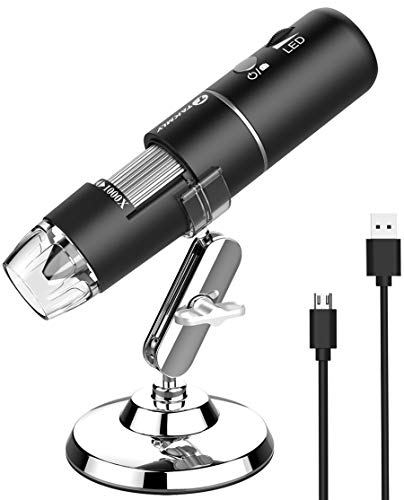
The T TAKMLY wireless model emphasizes flexibility across devices with 50x–1000x magnification and 8 LED lights for consistent illumination. It supports iPhone, Android, and computer use via USB, with optional software for different platforms. The device stands out for its compact design and the ability to view and capture images or videos through a connected smartphone, making it a versatile option for on-the-go inspections and classroom demonstrations.
Key considerations
Pros: Broad compatibility, built-in lighting, compact form factor. Cons: App support varies by platform; some users report a need to adjust focus carefully at higher magnifications.
Plugable USB Digital Microscope

This Plugable 250x micro camera emphasizes broad OS compatibility and an adjustable, flexible arm stand that makes it easy to place the unit on a work surface for steady observations. It uses a webcam-style sensor and supports Windows, macOS, ChromeOS, Linux, and Android, with both USB and USB-C connections. It’s designed for easy grab-and-go examination, including time-lapse and video capture, making it a practical choice for students and hobbyists who want a sturdy, plug-and-play option.
Key considerations
Pros: Flexible mounting, broad OS support, ready for both photo and video capture. Cons: Maximum magnification is lower than some 1000x models; image detail improves with stable lighting and proper focus.
SkyBASIC Macro Handheld Digital Microscope

The SkyBASIC macro model focuses on a pocket-friendly experience with a 2-inch IPS color display and fixed focus at 500x magnification. It stores up to 100 photos onboard and offers a simple, one-click capture method. Aimed at learners and hobbyists, this device emphasizes ease of use and immediate on-device viewing, with the option to save images externally if a memory card is used.
Key considerations
Pros: Quick setup, portable, easy image capture. Cons: Fixed focus limits use on non-flat samples; higher magnification may require careful positioning for best results.
Buying Guide
Magnification range: Most home and classroom needs land between 50x and 1000x. Decide if you need high magnification for tiny details or a broader view for larger specimens. LCD displays and smartphone compatibility can reduce the need for a computer, while USB connections offer stable workstations.
Display and capture options: Evaluate whether on-device viewing (LCD screen) or using a computer make more sense for your workflow. Built-in storage or the ability to add memory cards expands capture capacity, especially for field work.
Lighting: Look for models with adjustable LED illumination. Even lighting reduces shadows and enhances detail, particularly at higher magnifications where depth of field is limited.
Ease of use and portability: For classroom or field use, a lightweight, plug-and-play design with simple controls is advantageous. Consider whether you need a stand, flexible arm, or handheld form factor for your tasks.
Connectivity and compatibility: If you work primarily on a computer, ensure the device supports your operating system (Windows, macOS, Linux) and connection type (USB, USB-C). If you want to view on a phone or tablet, confirm reliable WiFi or app compatibility with iOS and Android.
Durability and accessories: A robust build with reliable stands or brackets increases longevity in busy environments. Check what is included (cables, memory cards, microSD) and whether replacements or spare parts are available should you need them.
Price-to-performance balance: Higher magnification often correlates with more features but not always with better value for your specific use. Align features with your primary tasks—coins, electronics, or biology—and prioritize those that directly support those tasks.
Overall, the best magnifying camera for computer-based work should combine easy setup, stable image capture, and clear viewing across devices. The five options above provide a spectrum of forms—from handheld WiFi-enabled units to compact LCD screens—so you can choose based on whether portability, on-device viewing, or cross-platform compatibility is most important to your projects.