Best Low Light 4K Cameras for Clear, Bright Home Office and Streaming Setups
Looking for a low-light 4K camera that keeps details sharp even in dim rooms? This guide highlights five top options that excel in low light, offer 4K or near-4K quality, and suit different needs from video conferencing to home security and content creation. Each pick is described with who it’s best for, why it was chosen, and a practical caveat. Use the buying guide to compare features such as ring lights, autofocus, and privacy options to match your setup.
| Product | Best For |
|---|---|
| Galyimage 4K Webcam with Ring Light | Bright, adjustable ring light for desk setups and video calls |
| NexiGo N680E Pro 4K Webcam with Ring Light | Premium processing with PDAF autofocus and adjustable lighting |
| Lavsoul 4K Webcam for PC & Mac | High resolution with fast autofocus and smart light correction |
| BKELHS 4K UHD Ring Light Webcam | High-quality 4K/1080p with built-in privacy cover and dual mics |
| Ring Floodlight Cam Pro | Security-focused, Retinal 4K with wide view and strong low-light colors |
Galyimage 4K Webcam With Ring Light

Best for: Desktop video calls and streaming in low-light rooms. This webcam supports 4K at 30FPS and 1080P at 60FPS for smooth conferencing. The built-in ring light has 3 color temperatures (white, natural, warm) and brightness control for skin tone accuracy. TOF autofocus and dual noise-canceling mics help maintain focus and clear audio in dynamic scenes. Caution: Depending on your computer’s capabilities, 4K output may be limited by software or hardware settings.
NexiGo N680E Pro 4K Webcam With Ring Light

Best for: Content creators who want top-tier 4K streaming and flexible lighting. The NexiGo N680E Pro uses a Sony 4K sensor, PDAF autofocus, and a tri-tone ring light with stepless brightness control. Dual mics provide clearer voice capture. Limitation: Output resolution depends on your software; some apps may cap at lower bitrates or frame rates unless configured properly.
Lavsoul 4K Webcam for PC & Mac

Best for: Users who want ultra-high-definition 4K at 30fps with strong low-light performance and reliable autofocus. The camera uses a 1/2.5″ sensor and a wide f/1.78 aperture to capture more light, with built-in light correction to balance brightness. Caution: High-resolution streaming may require a strong PC and network to prevent buffering during 4K output.
BKELHS 4K UHD Ring Light Webcam
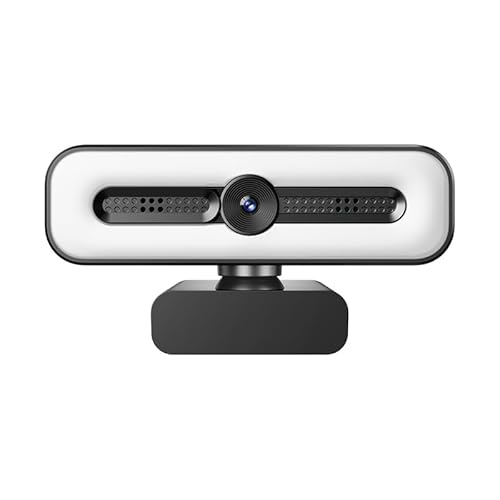
Best for: Conference rooms and streaming where privacy and voice clarity matter. Features include 4K/1080P, three LED color temperatures, stepless brightness, PDAF autofocus, and dual microphones. Limitation: Requires software support to fully utilize 4K; if not supported, it may default to 1080P.
Ring Outdoor Cam Pro With Low-Light Sight

Best for: Exterior security with true color in varied lighting and enhanced zoom. Retinal 4K, up to 10x zoom, and low-light sight allow color video with ambient lighting and switch to black-and-white in darker conditions. Caution: It’s designed for outdoor use; ensure proper installation and weather considerations.
Buying Guide
What should you prioritize for low-light 4K performance?
Look for true 4K or near-4K sensors, a wide aperture, and a built-in ring light or ring light compatibility. Ring light brightness control and color temperature options help maintain natural skin tones in dim settings.
Autofocus, audio, and privacy considerations
PDAF autofocus keeps moving subjects in focus, which is important for dynamic scenes. Dual noise-canceling microphones reduce ambient sounds. Privacy shutters or covers protect against webcam misuse when not in use.
Connectivity and software compatibility
Verify USB plug-and-play readiness and compatibility with your video apps (Zoom, Teams, Google Meet, Twitch). Some 4K streams depend on computer hardware and software support; confirm that your setup can handle 4K output without bottlenecks.
Which setup fits your use case?
Video calls and streaming in dim rooms benefit from a built-in ring light and fast autofocus. Security devices prioritize privacy features and wide field-of-view. Content creators should favor 4K sensors and color-grade-friendly codecs for post-production.
FAQ
- What is the practical difference between 4K and 1080p webcams in low light?
4K provides more detail; however, low light performance depends on sensor size, aperture, and noise handling. In dim rooms, a 1080p webcam with strong light compensation may appear clearer than a weak 4K feed. - Do webcams with ring lights require separate lighting in a dark room?
No, the built-in ring light helps, but for very dark rooms you might still need extra illumination or a brighter light source for optimal skin tones and detail. - Is privacy protection common on high-end 4K webcams?
Many models include privacy shutters or covers; this is recommended to prevent lens exposure when not in use. - Can these cameras work with macOS and Windows equally well?
Most are plug-and-play across major OSes, but some features (like 4K output or certain autofocus modes) may depend on software support. - Will 4K streaming consume more network bandwidth?
Yes. 4K streams require higher bitrate; ensure your network can handle the traffic to avoid buffering during calls or streams. - Which camera is best for security purposes?
Ring models with Retinal 4K and motion detection offer robust monitoring, but choose based on indoor vs. outdoor needs and the required field of view.