Best Low Budget Cameras for Clear Video on a Budget
Discover affordable cameras that deliver solid image quality, reliable performance, and easy setup. This guide focuses on budget-friendly options for video calls, streaming, and casual photography, highlighting features like low-light correction, built-in mics, and plug-and-play compatibility. Each pick is evaluated on video clarity, audio quality, ease of use, and value, helping you choose a camera that fits a tight budget without sacrificing essential capabilities.
| Product | Brand | Key Features |
|---|---|---|
| Anker PowerConf C200 | Anker | 2K resolution, AI noise-canceling mics, low-light correction |
| Lusinx 2K Webcam | Lusinx | 2K image, auto low-light correction, mic, privacy cover |
| Lusinx 1080P Webcam | Lusinx | 1080P, auto light correction, privacy cover, plug & play |
| Newline 4K Webcam With Tripod | N newline | 4K, PDAF, low distortion, privacy cover, tripod |
| ZOSI 1080P Surveillance Camera | ZOSI | 2.0MP HD, 4-in-1 compatibility, night vision |
Anker PowerConf C200 2K Webcam

The Anker PowerConf C200 is a compact webcam designed for professional-sounding calls on a budget. It offers 2K Ultra-Clear Resolution for sharp video and AI-powered noise-canceling dual mics to improve speech clarity in imperfect environments. Its low-light correction helps maintain color and detail in dim rooms, making it suitable for late-evening meetings, online classes, or streaming sessions. Plug-and-play USB connectivity and an adjustable field of view add flexibility for desk setups and small studios.
Lusinx 2K Webcam

The Lusinx 2K Webcam combines higher-than-HD resolution with real-time AI noise suppression for clear voice pickup in busy environments. Its superior low-light auto correction helps keep subjects looking sharp in dim offices or rooms. The webcam is designed for webinars, conferences, and streaming, featuring a built-in microphone that minimizes background distraction and preserves focus on the speaker.
Lusinx 1080P Webcam

This Lusinx model aims for broad compatibility and straightforward setup with USB plug-and-play. It features automatic low-light correction, autofocus, and a privacy cover to keep your lens secure when not in use. The built-in microphone supports everyday calls, making it a practical, budget-friendly option for students, freelance professionals, and home offices.
Newline 4K Webcam With Tripod

The Newline 4K Webcam with Tripod delivers 4K resolution for exceptionally crisp video. It uses precise PDAF autofocus for stable framing and low distortion optics for natural-looking images. The built-in microphones provide clear audio, while the privacy cover and included tripod expand mounting options. This camera targets creators and professionals who want high quality on a budget and flexibility in placement.
ZOSI 1080P Surveillance Camera
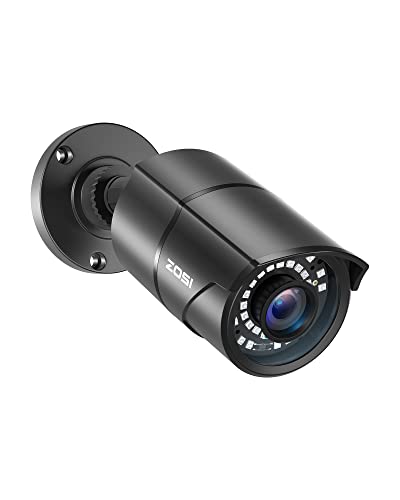
The ZOSI 1080P surveillance camera is a versatile option for home or small business monitoring. It supports multiple video standards and is compatible with various DVR systems. The 1080P HD feed, 120-foot night vision capability, and weather-resistant design make it a practical budget security camera for indoor or outdoor use, offering peace of mind at a low total cost of ownership.
Buying Guide: Key Purchase Considerations
- Resolution and image quality: If you mainly use video calls, 1080p is usually sufficient; 2K or 4K provides crisper detail for presentations or streaming, but may require more bandwidth and PC power.
- Low-light performance: Look for cameras with low-light correction or larger sensors to reduce grain in dim rooms and during evening sessions.
- Audio quality: Built-in mics with noise cancellation help maintain clear voice transmission in noisy environments; consider an external mic if you need broadcast-grade audio.
- Autofocus and stability: PDAF or reliable autofocus ensures consistent framing during movement or camera tilts; fixed focus cameras are less adaptable.
- Privacy features: A physical privacy shutter or a clear lens cover protects your privacy when the camera is not in use.
- Connectivity and drivers: USB plug-and-play is ideal for quick setup. Some cameras require no driver installation, while others may offer software to adjust settings.
- Versatility and mounting: A flexible mount, tripod compatibility, and additional features like wide FOV help tailor the camera to desks, laptops, or studios.
- Durability and lens quality: For outdoor or security uses, weather resistance and robust build matter; for desktops, reliability and compact form are key.
- Price-to-feature balance: Evaluate essential features against price to ensure you’re not paying for bells and whistles you won’t use.
When choosing a budget camera, align features with your primary tasks—video calls, streaming, or security monitoring—while considering your hardware and network constraints. These five options provide a spectrum of capabilities that fit a low-budget approach without sacrificing core performance.