Best HD Monitors for Camera Use: Clear Guides and Picks
Answering the question of which HD monitor best supports camera workflows, this guide highlights five reliable options for security, field work, and everyday video monitoring. Each pick is evaluated for clarity, connectivity, and suitability to common camera setups. Best for surveillance, on-the-go filming, and desktop CCTV monitoring, these monitors help you see sharp, accurate footage. The buyer should consider size, input options, and viewing comfort to match their camera system and working environment.
| Product | Best For | Key Specs |
|---|---|---|
| Real HD Security Monitor Screen, 22 Inch | Home or small business CCTV | 22″, 1080p, 75Hz, 178° viewing, built-in speakers |
| FEELWORLD FW759 7 Inch Monitor | DSLR or mirrorless camera field work | 7″, 1280×800, 4K HDMI input, lightweight |
| JINSWY 10.1″ Security Monitor | Compact CCTV setups | 10.1″, 1024×600, HDMI/VGA/BNC/AV/USB |
| NEEWER F700 7″ Camera Field Monitor | Pro video assist with LUTs | 7″, 1920×1080, 2000nit, 4K HDMI loop, LUT support |
| ASUS 27” BE279QSK Video Conference Monitor | Desktop conferencing setups | 27″, 1080p, IPS, built-in webcam and mic |
Real HD 22-Inch Security Monitor

Best for: Small CCTV rooms or shop floors needing reliable, clear surveillance feeds. This monitor uses W-LED, a 3000:1 contrast ratio, and Full HD 1920×1080 resolution to deliver crisp images. Its 75Hz refresh rate and 4ms response time support smooth video playback, which is helpful for monitoring moving footage. The 178° viewing angle helps when multiple operators view the screen from different positions. This model is suitable for most DVR/NVR setups and integrates easily with existing security systems.
Caution: It does not support Bluetooth or WiFi, which may limit wireless peripheral options. Consider wired accessories or a separate wireless bridge if needed.
FEELWORLD FW759 7” DSLR Field Monitor
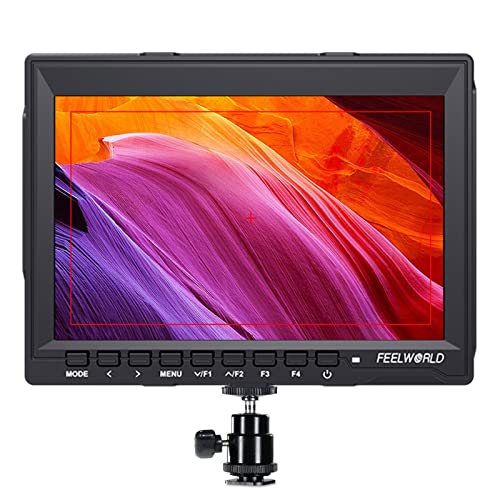
Best for: On-the-go filming with DSLRs or mirrorless cameras. The FW759 features a 1280×800 IPS display, wide color gamut, and 400 cd/m2 brightness for accurate color when shooting handheld. Its slim 17mm profile and 300 g weight make it easy to mount on stabilizers or gimbals, while still offering 4K HDMI input for high-quality camera feeds. This monitor is ideal when you need portable monitoring without bulk.
Caution: While it handles 4K HDMI input, some cameras may output higher bitrates than the monitor can fully process. Check your camera’s output format compatibility if using advanced log profiles.
JINSWY 10.1″ Security Monitor

Best for: Compact surveillance setups seeking multiple input options. The 10.1-inch display resolves 1024×600 with 300 cd/m² brightness and a high 500:1 contrast ratio, presenting clear detail for CCTV footage. It includes HDMI, VGA, BNC, AV, and USB ports, linking easily to CCTV systems, PCs, or Raspberry Pi projects. The built-in speakers add quick audio monitoring for small spaces.
Caution: The display resolution is modest by modern standards, so expect smaller text or detail compared to larger 1080p or higher monitors. It’s better suited for basic monitoring and occasional desktop use.
NEEWER F700 7″ Field Monitor

Best for: Professional video assist on compact rigs. The F700 offers a 7-inch IPS panel with 1920×1080 resolution and up to 2000 nit brightness for bright environments. It supports 4K HDMI loop in/out and includes features like false color, zebras, waveform, histogram, and 3D LUTs. The 360° ball head and NP-F750 battery compatibility provide versatile field use and focus on critical monitoring tasks.
Caution: High brightness helps outdoors but can consume more power. Planning battery life and power management is essential for longer shoots.
ASUS 27” BE279QSK Conference Monitor

Best for: Desktop video conferencing and productivity setups. This 27-inch Full HD display uses an IPS panel for wide viewing angles, enhancing viewing comfort during long sessions. It includes an integrated webcam, microphone array, and speakers for convenient conferencing. Connectivity includes HDMI, DisplayPort, and VGA, along with USB and audio options, making it a flexible choice for home offices or small conference rooms.
Caution: Full HD resolution on a 27-inch screen can appear less sharp than higher-resolution displays. If you require crisper detail for editing or design work, consider a higher resolution option or scaling.
Buying Guide: How To Choose The Right HD Monitor For Camera Use
- Screen Size And Resolution: Larger screens help with detailed monitoring; higher resolutions reveal more precise image details. Choose based on your workspace and the type of footage you review.
- Input And Output Options: Ensure the monitor supports the camera outputs you use (HDMI, VGA, BNC, AV, USB). Loop-through HDMI is helpful for quick multi-device setups.
- Color Accuracy And Brightness: IPS panels with good brightness and a wide viewing angle prevent color shifts when viewed from different positions. Outdoor or high-contrast environments benefit from high nit brightness.
- Built-In Audio Or Dedicated Audio: For surveillance and basic monitoring, built-in speakers can be convenient. For professional video work, rely on external audio monitoring for higher fidelity.
- Power And Portability: Field monitors should be lightweight, battery-friendly, and mountable. Desktop monitors should prioritize ergonomic stands and adjustable mounting options.
- Specialized Features: LUT support, waveform, vectorscope, peaking focus, and safe frames help with professional video monitoring. Consider these if your workflow requires precise exposure and focus tools.
- Reliability And Compatibility: Check whether the monitor integrates with your DVR/NVR, camera brands, and any existing security or editing workflow you use.
FAQ
- What size monitor is best for CCTV monitoring?
– A larger screen (around 22–27 inches) is often best for CCTV monitoring as it displays more detail, but consider desk space and viewing distance. - Do field monitors support 4K input?
– Some field monitors support 4K HDMI input, but ensure your camera outputs match the monitor’s capabilities to avoid compatibility issues. - Is built-in speakers important for camera monitoring?
– Built-in speakers are convenient for quick audio checks, but for professional monitoring, use high-quality external audio. - Should I prioritize brightness or color accuracy?
– Both matter: brightness helps in bright environments; color accuracy ensures faithful footage review. Balance with the intended use. - Can I use these monitors with Raspberry Pi or PCs?
– Yes, many monitors support HDMI and USB inputs suitable for Raspberry Pi, PCs, and other devices common in camera projects. - What is a good monitor for video conferencing and security?
– Look for models with integrated webcam and microphone for convenience, plus reliable HDMI/DisplayPort inputs for easy connection.