Best Hand Held Photo Printer Options for Quick Snaps and Scrapbook Moments
Looking for a compact, pocketable way to print photos directly from your phone? This guide highlights five top hand held photo printers suited for different needs—from casual crafters to students and travelers. Each option is evaluated for print quality, ease of use, connectivity, and value. Read on to find the best match for your printing style and device ecosystem.
| Product | Best For | Why It Stands Out |
|---|---|---|
| KODAK Step Instant Photo Printer | Smartphone selfie fans | Zero-ink printing with sticky 2×3” paper and robust editing app |
| Liene M100 4×6 Photo Printer | Vibrant color prints for albums | Thermal dye sublimation with 4×6 size and Wi-Fi direct printing |
| KODAK Dock Plus 4×6 Photo Printer | Desktop home printing | Integrated docking station for easy phone placement and rapid 4×6 prints |
| Nelko PP01 Mini Photo Printer (White) | Sticky-back mini photos | Compact inkjet printing with adhesive back; Bluetooth with app editing |
| HP Sprocket Portable Photo Printer | Party-printing on the go | Pocket-sized printer with multi-device printing and interactive LED lights |
KODAK Step Instant Smartphone Photo Printer

The KODAK Step is designed for iOS and Android users who want quick, selfie-friendly prints. It uses ZINK sticky-backed 2×3” paper with embedded dye crystals, producing durable photos that resist moisture and smudges. The built-in editing suite within the KODAK App allows for collages, filters, borders, and text. Best for: social media enthusiasts who want tangible keepsakes from their mobile gallery. Caution: prints may require periodic app updates for full editing features.
Liene M100 4×6 Photo Printer

The Liene M100 prints 4×6 photos using thermal dye sublimation, delivering vibrant colors and durable finishes. It ships with a complete cartridge and paper kit, making it a strong choice for families who want quality album-ready prints. Best for: households seeking larger prints without a computer, and users who prioritize color fidelity. Limitation: 4×6 size may not fit some compact scrapbooks or mini albums.
KODAK Dock Plus 4×6 Photo Printer

The Dock Plus couples a docking station with a 4×6” dye-sub printing engine. It’s straightforward to use: power on, pair via Bluetooth, and print. The three-layer dye-sub process with a protective lamination yields sheets resistant to fingerprints and fading. Best for: users who want a dependable, desk-friendly printer for family pics and quick gifts. Caution: larger footprint than pocket models, and keeps your phone docked during printing.
Nelko PP01 Mini Photo Printer (White)

The Nelko PP01 Mini offers 2×3” sticky-backed prints via Bluetooth, with app-based editing. It’s ultracompact, making it ideal for travelers and students who want to create quick narrative photo strips. Best for: on-the-go printing with adhesive backs for scrapbooks and walls. Limitation: 2×3” format is smaller than typical 4×6 prints, which may not suit every project.
HP Sprocket Portable Photo Printer (2nd Edition)
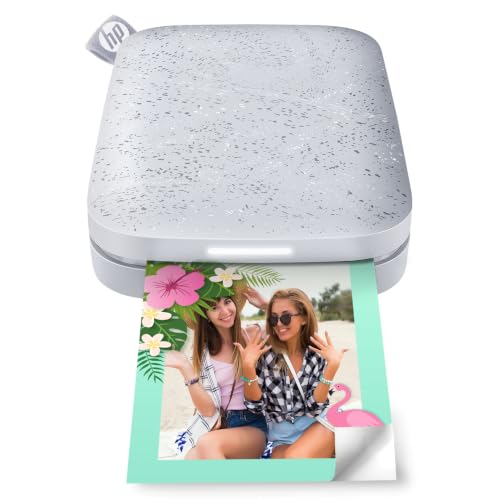
The HP Sprocket 2nd Edition prints 2×3” sticky-backed photos and supports multi-device printing, including AR-friendly features via the Sprocket app. Its compact design makes it a favorite for social events and spontaneous photo sharing. Best for: groups who want a social printing experience and easy portability. Caution: AR features require compatible device apps and periodic app updates.
Buying Guide: Key Considerations for Your Hand Held Printer
- Print Size vs. Portability: Do you prefer compact 2×3” prints or larger 4×6” photos for albums?
- Paper Type and Durability: Sticky-backed papers enable quick scrapbooking, while dye-sub prints offer water- and fade-resistance.
- Connectivity: Bluetooth vs. Wi-Fi vs. Near Field Communication (NFC). Consider where you’ll print—on the go or at home.
- App Features: Look for editing tools, collage creation, borders, stickers, and text options within the native app.
- Ease of Use: How straightforward is setup, pairing, and loading paper?
- Device Compatibility: Ensure the printer supports your iOS or Android version and any computer if needed.
- Cost of Consumables: Consider ongoing paper and cartridge costs per print when comparing models.
- Paper Availability: Availability of official photo paper bundles and third-party options can affect value.
Frequently Asked Questions
- What’s the simplest hand held printer for beginners? Answer: Printers with automatic pairing and minimal setup, like models with built-in docking or easy Bluetooth pairing, tend to be the most beginner-friendly.
- Are sticky-back photos suitable for scrapbooks? Answer: Yes, sticky-back 2×3” or 4×6” papers are designed for quick affixing to pages and crafts.
- Can I print from iOS and Android with the same device? Answer: Many models support both via Bluetooth or a dedicated app; check compatibility before purchasing.
- Do these printers require a computer? Answer: Most are smartphone-first devices; only a few models offer direct computer printing or USB charging options.
- Is dye-sublimation better than inkjet for photos? Answer: Dye-sub generally yields durable, smudge-resistant prints with a clear laminate.
- Will I need to replace ink or paper often? Answer: Inkjets (Nelko PP01) use cartridges; dye-sub printers use paper packs; check page yields and costs per print.