Best Film to Photo Converter: Easy Digitization of Your Negatives and Slides
Need a reliable film to photo converter to turn old negatives and slides into easy-to-view digital images? This guide highlights top picks that suit different user needs, from beginners to enthusiasts. Each product section explains who it’s best for, why it was chosen, and a practical limitation to watch for. Use the buying guide and FAQ to compare features, formats, and ease of use before deciding.
Quick product snapshot for fast comparison:
- KODAK Slide N SCAN Film & Slide Scanner — best for traditional slide collectors seeking an LCD preview and straightforward loading.
- DigitPro Photo Scanner and Film Digitizer (5” Screen) — best for parents and casual historians who want a built-in display and simple one-device operation.
- Magnasonic All-in-One 24MP Scanner — best for high resolution on a single device with HDMI output for viewing on a TV.
- HP Touch Screen Film & Slide Scanner — best for users who want a touchscreen experience with quick, guided scanning.
- DigitConvert Mobile Film Scanner — best for portable, on-the-go digitization using a companion app on a phone.
Summary table of selected products:
| Product | Best For | Key Benefit | Potential Limitation |
|---|---|---|---|
| KODAK Slide N SCAN | Slide collectors | 5” LCD preview, continuous loading | SD card needed for saving |
| DigitPro 5” Screen Scanner | Families and home use | One-device operation with large display | Memory expansion required for many scans |
| Magnasonic 24MP Scanner | High-resolution need | HDMI out for big screen viewing | Built-in memory limited |
| HP Touch Screen Scanner | Touchscreen lovers | 13 MP sensor, quick-feed tray | Viewed best with compatible displays |
| DigitConvert Mobile Scanner | Travelers | Battery-powered, phone-ready | App setup required |
KODAK Slide N SCAN Film & Slide Scanner

Best for: Traditional slide collectors and mixed-format users who want a simple, all-in-one scanning solution. Why selected: It supports 135, 110, and 126 film formats and uses a 5” LCD for instant preview and editing. The built-in quick-load tray speeds up work, and adapters for multiple formats extend its versatility. The model also creates JPEG files directly to an SD card (not included) for straightforward storage and sharing. Limitation: Saving requires an SD card, so plan for compatible storage upfront.
Film and Slide Scanner – 22MP, 5” LCD

Best for: Families and casual historians who want an all-in-one device with a large display. Why selected: This scanner supports 35mm/135, 110, 126 negatives and 50mm slides, plus Super 8 film, with a 5” LCD for immediate review. It offers one-touch scanning and simple color/brightness adjustments directly on the unit. Limitation: External memory support is required for many files (built-in memory is modest).
Mobile Film Scanner for 35mm Slides & Negatives
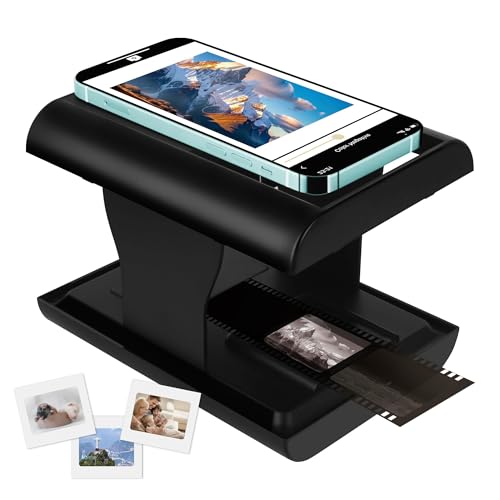
Best for: Travelers and quick-scan enthusiasts who want to digitize with a phone. Why selected: It digitizes 35mm slides and 135 film negatives directly to a phone in JPEG, aiding instant sharing. The device folds compactly for portability. Limitation: Requires a compatible phone and a supported app; performance depends on device compatibility.
Magnasonic All-in-One 24MP Scanner

Best for: Users seeking high resolution and flexible viewing options. Why selected: It converts 35mm, 110, 126, Super 8 films and slides into 24MP JPEGs with a 5″ LCD and HDMI output for big-screen viewing. The built-in memory plus SD card support enables substantial storage. Limitation: HDMI cable is not included, so an extra accessory may be needed for TV viewing.
DigitPro 35mm Film & Slide Scanner with 2.4” LCD

Best for: Budget-conscious shoppers who want a compact standalone scanner. Why selected: This unit converts 135 negatives and slides to JPEGs and supports 2.4” LCD preview with TV-out sharing for larger viewing. It also features a fast-loading slide feeder for large batches. Limitation: Smaller screen may be less convenient for precise edits compared with larger displays.
DigitPro Photo Scanner with 5” Screen

Best for: Users who want an all-in-one device for 35mm, 110, and 135 negatives plus photos. Why selected: It includes 8GB SD card and a 5” LCD, enabling standalone digitization of multiple formats without a computer. Limitation: SD card capacity may limit batch size before needing additional storage.
HP Touch Screen Film & Slide Scanner

Best for: Users who value a touchscreen interface and guided workflow. Why selected: The 13 MP sensor delivers clear images, with a quick-feed tray for fast batch scanning and a 50mm adapter for slides. Limitation: Requires direct connection to a display for best viewing, depending on setup.
Buying Guide
What format do you need to digitize?
Consider whether you primarily work with 35mm negatives, 110/126 formats, slides, or a mix. Some scanners handle multiple formats with adapters, while others specialize in a narrower range.
Do you prefer standalone or computer-connected scanning?
Standalone units offer on-device editing and viewing, while computer-connected models can provide broader editing capabilities and storage options. Decide based on your comfort level with setup and software.
How important is a built-in display?
A large LCD improves previewing and editing without a computer. If you often share memories with family, a 5” or larger display helps you confirm quality before saving.
Where will you store digital files?
Check whether the device saves to internal memory, SD cards, or requires a phone/computer. Plan storage capacity to avoid frequent transfers, especially if digitizing large photo collections.
What is your portability requirement?
For travel or on-the-go work, consider compact, battery-powered scanners or models that pair with phones. Portability may trade off screen size or ease-of-use.
What is the expected workflow?
Some devices offer one-touch scanning with automatic color and brightness adjustments, while others require more manual tweaking. If you value speed, prioritize one-touch or auto-adjust features.
FAQ
- Q: Do these scanners work with all film types?
- A: Most models support 35mm (135), 110, and 126 formats, with some handling slides and Super 8 as well. Always verify supported formats in product descriptions.
- Q: Is an external power source required?
- A: Most units operate on included adapters or USB power. Battery-powered portable options exist, but check charge longevity if you plan extended sessions.
- Q: Can I edit images on the device?
- A: Many devices offer basic color and brightness adjustments on the LCD. More extensive edits typically require a computer or compatible app.
- Q: Do I need a computer to use these scanners?
- A: Some are standalone with built-in displays, while others save to SD cards or phones and may benefit from computer-based editing.
- Q: What about file formats and resolution?
- A: Common outputs are JPEG with resolutions from 22MP to 24MP, suitable for archiving and sharing. Check the product specs for exact capabilities.
- Q: Are adapters included?
- A: Several products include slide or film adapters; confirm what comes in the box to ensure you can scan your target formats immediately.