Best External Monitors for Video Cameras and Field Work
Choosing an external monitor tailored for video cameras can dramatically improve focus, exposure, and overall on-set monitoring. This guide highlights five top options known for bright displays, accurate color, and practical features for on-camera work, whether you’re filming on a gimbal, in a studio, or in the field. Each selection balances size, weight, and usability to help you monitor your footage with clarity and confidence.
| Product | Brand | Key Benefit |
|---|---|---|
| FEELWORLD FW759 | FEELWORLD | Compact on-camera monitor with 4K HDMI input and bright display |
| NEEWER F100 | NEEWER | 7-inch IPS panel with HDMI inputs, sun shade, and robust video assists |
| NEEWER F700 | NEEWER | 2000nit brightness option with LUTs and waveform tools |
| FEELWORLD S55 V3 | FEELWORLD | 6-inch field monitor with LUTs, peaking, and waveform monitoring |
| ASUS BE279QFK | ASUS | 27-inch Full HD monitor with integrated webcam and ergonomic design |
FEELWORLD FW759 7 Inch Field Monitor
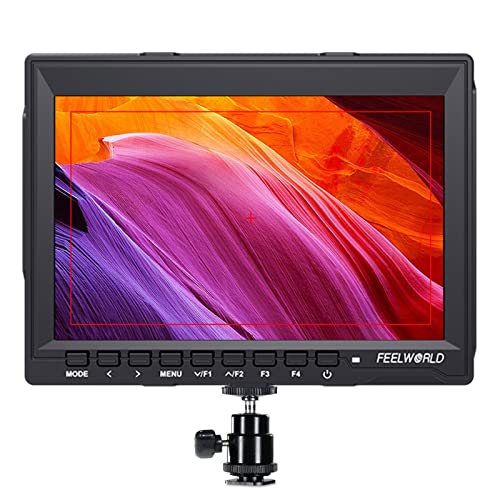
FEELWORLD FW759 offers a compact, portable solution for on-the-go filming. Its 7-inch IPS panel provides accurate color and wide viewing angles, with a resolution of 1280×800. The monitor supports 4K HDMI and AV input, enabling compatibility with most DSLRs and camcorders. Its slim form factor makes it ideal for mounting on stabilizers or rigs, while its brightness and color handling aid critical on-set decisions in variable lighting.
Key features include:
- HDMI input supporting 4K formats for high-quality signal pass-through
- Ultra-slim 17mm thickness and light build for portable setups
- Wide color gamut for accurate previews of color-critical shoots
NEEWER F100 7-Inch Field Monitor

The NEEWER F100 is a 7-inch field monitor designed for DSLR and mirrorless workflows. Its IPS panel delivers clear, bright images with wide viewing angles, while the 450 nits brightness helps maintain visibility outdoors. It includes a sunshade to reduce glare, making it suitable for exterior shoots, and a flexible input/output setup that supports on-camera monitoring and playback during takes.
Highlights:
- 7-inch IPS panel with 1280×800 resolution
- Sunshade included for daylight viewing
- HDMI input to support camera feeds and on-set review
NEEWER F700 7-Inch 2000nit Field Monitor

The NEEWER F700 stands out for higher brightness and advanced monitoring tools. With a 2000-nit brightness option and 7-inch IPS display, it remains readable under challenging lighting. The monitor provides 4K HDMI loop in/out, essential waveform, false color, and LUT support, helping operators verify exposure and color grading in real time.
Key aspects:
- High-brightness option for outdoor shoots
- 4K HDMI loop in/out for flexible signal routing
- Professional video assist tools and LUT support
FEELWORLD S55 V3 6-Inch Field Monitor

The FEELWORLD S55 V3 is a compact field monitor designed for DSLR rigs and gimbals. It supports 4K HDMI input/output and includes robust video assist features such as waveform monitoring, false color, and focus peaking. Its LUT loading capability lets filmmakers preview looks on set, making it a practical choice for mobile productions where weight and space are at a premium.
Highlights include:
- 4K HDMI input/output for versatile camera compatibility
- LUT support and focus assist for on-set look management
- Compact form factor with reliable monitoring tools
ASUS 27” 1080P Video Conferencing Monitor BE279QFK

The ASUS BE279QFK combines a large display with built-in webcam, microphone array, and speakers—features that simplify on-site video conferencing and review sessions. While larger than a typical field monitor, its IPS panel offers wide viewing angles and strong color accuracy, making it suitable for controlled environments where space allows and an integrated webcam can reduce external gear needs.
Key points:
- Integrated webcam and audio for quick collaboration
- 27-inch IPS panel with wide viewing angles
- Ergonomic stand design and wall-mount compatibility
Buying Guide: External Monitors For Video Cameras
When selecting an external monitor for video cameras, consider how you’ll use it on set, in the field, and during post-production checks. The following factors help balance performance and practicality across different shooting environments.
- Display size and brightness: Field work often requires brighter displays (over 1000 nits) to combat daylight. Smaller on-camera monitors (5–7 inches) excel for quick framing, while 7–9 inches can provide more detailed scopes for exposure and focus.
- Resolution and color accuracy: A sharp 1280×800 or 1920×1080 panel with wide color gamut improves critical decisions. Look for IPS panels for consistent color across viewing angles.
- HDMI compatibility and loop-through: 4K HDMI input supports high-resolution camera feeds. Loop-in/loop-out or SDI options offer flexible signal routing for on-set monitoring and external recorders.
- Video assist features: Waveform, vectorscope, histogram, false color, and peaking help verify exposure and focus. LUT support enables previewing looks as you shoot.
- Power and mounting: Battery options, included sun shades, and robust mounting hardware reduce setup time. Weight matters for gimbals and handheld rigs.
- Integrated vs. separate gear: Integrated features (webcams, built-in mics) can reduce gear load in small rigs, but dedicated field monitors often provide more precise color tools and brighter displays.
- Durability and weather resistance: Field conditions require sturdy housings and glare reduction. A sun hood can dramatically improve visibility outdoors.
To optimize on Bing search results, an article about external monitors for video cameras should emphasize use cases (on-camera monitoring, daylight filming, focus validation), compatibility with popular camera brands, and practical buying tips. Highlighting real-world scenarios—such as handheld shooting on a stabilization rig or studio interviews with a teleprompter—helps align content with user intent and improves engagement signals for search.