Best Cheap External Monitors for DSLR Cameras in 2026
Best value external monitors for DSLR cameras combine clear image quality, portability, and essential tools at a budget-friendly price. This guide highlights five cost-conscious picks, ideal for hobbyists, vloggers, and on-the-go filmmakers who need better monitoring without breaking the bank. The top options emphasize portability, reliable 4K HDMI input, and practical on-screen tools to improve focus, exposure, and framing.
| Product | Best For | Why Selected |
|---|---|---|
| FEELWORLD FW759 7 Inch DSLR Camera Field Monitor | Travel shooters and gimbal setups | Lightweight, slim design; 1280×800 IPS display with 4K HDMI input for versatile camera compatibility |
| FEELWORLD FW759 7 Inch 400nit On Camera Field Monitor | Vloggers and indoor shoots | Clear external view, focus tools, and sun shade for outdoor visibility; lightweight with 300g |
| FEELWORLD S55 V3 6 Inch Monitor | Indoor studios and close-range setups | Accurate exposure tools (waveform, histogram, LUTs); compact 6″ size with sun hood |
| MNN Portable Monitor 15.6 Inch | Remote work, travel and multi-device use | Large screen for laptop/phone compatibility; dual Type-C ports for easy plug-and-play |
| FEELWORLD FW759PRO 7 Inch Touchscreen Monitor | On-the-go creative setups | Touchscreen, 4K HDMI in/out, slim form factor with robust monitoring tools |
Note: The selections prioritize budget-conscious buyers who still need reliable monitoring tools for DSLR workflows. All models listed are external monitors designed to pair with a variety of DSLRs and mirrorless cameras, offering improved framing, exposure control, and focus assistance compared to native camera screens.
FEELWORLD FW759 7 Inch DSLR Monitor — Slim Field Monitor
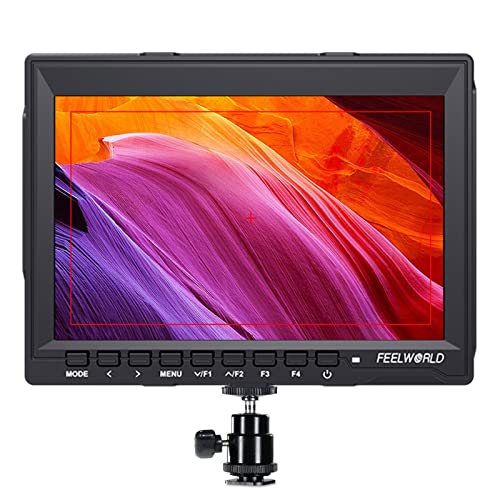
Best for: On-the-go filming with stabilizers and gimbals. This lightweight 7″ monitor provides a large viewing area with 1280×800 resolution and IPS color accuracy. It supports 4K HDMI input, making it compatible with most DSLRs and camcorders. The slim 17mm profile and 300g weight reduce rig bulk, improving balance on handheld rigs.
Why selected: Its portability and broad compatibility deliver essential monitoring features without adding significant weight or bulk. The 4K HDMI input supports common high-resolution cameras, aiding precise framing and exposure decisions in dynamic shooting environments.
Caution: While compact, the 7″ screen may still require a sunshade in bright outdoor conditions to maintain visibility.
FEELWORLD FW759 7 Inch 400nit On Camera Monitor

Best for: Creators who need a bigger view than camera screens for indoor shoots and social media work. The 400nit, 1280×800 IPS panel offers a clear view with focus tools and exposure aids. A sunshade is included to improve outdoor visibility during field work.
Why selected: It balances screen size, image clarity, and practical tools like focus peaking, histogram, and exposure warnings, which help prevent missed shots in tight shooting windows.
Caution: Performance may be limited in extremely bright outdoor conditions without proper shading or shaded shooting environments.
MNN Portable Monitor 15.6 Inch

Best for: Remote work, travel, and multi-device monitoring. The 15.6″ Full HD 1080p IPS display offers crisp visuals for laptop, phone, and camera use. It supports dual Type-C connections for power and display, enabling plug-and-play with many devices.
Why selected: The larger screen improves multitasking and viewing comfort for longer sessions, while the Type-C ports simplify setup across devices. It’s a practical choice when a portable multi-monitor solution is needed.
Caution: Ensure your devices support USB-C DP Alt Mode for full display functionality; some devices may require additional adapters.
FEELWORLD FW759PRO 7 Inch Touchscreen Monitor

Best for: Creative professionals needing quick on-site adjustments. This 7″ touchscreen monitor adds a responsive UI, Rec.709 color, and 4K HDMI input/output with a slim body for mobile rigs. The included F550 battery compatibility and tilt options aid flexible shooting angles.
Why selected: The touchscreen interface simplifies quick checks of exposure, focus, and color during shoots, while the 4K input/output and built-in monitoring tools support dynamic production workflows.
Caution: The touch interface may require occasional calibration for color accuracy in varying lighting conditions; use the provided sunshade in bright environments.
Buying Guide
What should I look for in a cheap external monitor for DSLR use?
Key features include screen size, resolution, HDMI input compatibility, brightness (nits), and color accuracy. A larger screen helps framing and focus, while higher brightness improves outdoor visibility. Look for focus tools (peaking, magnification), exposure tools (histogram, waveform, false color), and LUT support for real-time color grading.
Is a larger screen always better?
Not necessarily. Larger displays provide easier viewing but add bulk. For gimbal work and travel, a 7″ monitor balances visibility and portability. For stationary setups, a compact 5.5″ or 6″ model may suffice if you require minimal weight.
What about power and compatibility?
Confirm power options (battery compatibility or DC input) and whether the monitor accepts your camera’s HDMI signal at 4K or 1080p. Some models include battery mounts or power outputs to run cameras or accessories, which can reduce cables and clutter on set.
Which features help with outdoor shooting?
Sun shade or hood, higher brightness (nit levels), and glare-resistant panels improve visibility outdoors. Also, a reliable sun hood helps maintain focus and exposure accuracy when lighting conditions change rapidly.
Are there any limitations to these budget monitors?
Budget monitors may have lower brightness, limited color precision compared to high-end models, and fewer advanced features. Some don’t include comprehensive calibration tools, and durability can vary. Consider your shooting environment and required tools when choosing.
What is the advantage of 4K HDMI input?
4K HDMI input allows you to monitor at higher resolution from compatible cameras, ensuring you see sharp details and precise focus. It also supports a broader range of cameras beyond entry-level DSLRs, aiding future-proofing of your rig.
FAQ
- What size external monitor is best for a DSLR rig?
Seven inches strike a balance between portability and a comfortable viewing area for most workflows; six inches works well for compact setups, while 5.5 inches is ultra-light for minimalist rigs.
- Do budget monitors affect autofocus accuracy?
No, autofocus is a camera function, but external monitors provide better visual feedback for manual focus decisions through focus peaking and magnification features.
- Can external monitors power other camera gear?
- Are LUTs important in a budget monitor?
Yes, LUT support lets you preview color grading in real time, which helps in planning the final look without re-shoots.
- Is a sun hood essential for outdoor shoots?
While not mandatory, a sun hood greatly improves visibility by reducing glare and reflections on bright days.
- Do budget monitors require calibration?
Some do not include comprehensive calibration, so plan to verify color accuracy in your workflow and adjust with LUTs as needed.
Some monitors offer power output or battery support, which can power accessories or the camera itself, reducing cabling needs.