Best Camera Stand for Streaming: Stable, Flexible Deskside Mounts for Clear Live Visuals
Streaming requires steady framing and quick, reliable adjustments. This guide highlights top desk and table camera stands that optimize your setup for live streams, video calls, and product demos. Each option balances stability, height range, and compatibility, helping you capture crisp footage without wobble. Below, you’ll find five highly compatible picks with features tuned for reviews, tutorials, or broadcast workflows.
| Product | Brand | Max Load | Height Range | Key Benefit |
|---|---|---|---|---|
| Webcam Tripod Stand Extendable | JCWINY | 1.5 kg | 11.5″–18″ | Stable desktop support with compact form |
| 30 Inch Webcam Stand | JCWINY | Varies by device | Up to 30″ | Long-reach flexibility for multiple angles |
| NEEWER Extendable Desk Mount TL283 | NEEWER | 3 kg | 17″–40″ | Tall, robust with 360° ball head |
| NEEWER ST45B Webcam Stand | NEEWER | Varies | 11.4″–17.7″ | Compact with phone holder for multitasking |
| SmallRig Camera Desk Mount | SmallRig Selection | 3 kg | 15″–35″ | Versatile for lights, cameras, and ring lights |
Summary: The options above cover a spectrum from ultra-compact, desk-friendly mounts to taller, more capable units with broader load capacity. Each one supports standard 1/4″ mounting threads common to webcams, phones, and compact cameras, making them suitable for streaming, tutorials, and live product demos. Consider your desk thickness, desired height, and whether you need integrated accessories like phone holders or ring-light adapters when choosing the best match.
JCWINY Webcam Tripod Stand Extendable
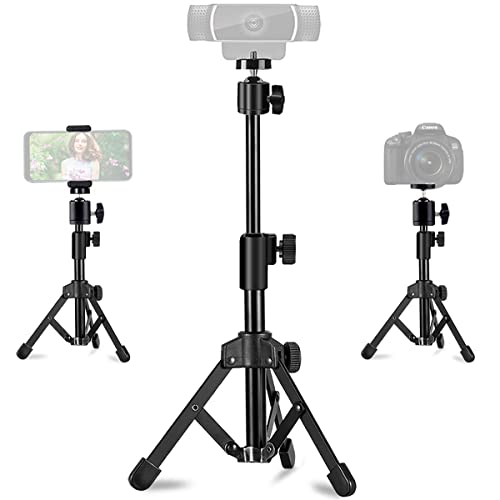
The JCWINY desk mount emphasizes stability with a metal frame and ABS components, plus non-slip rubber pads to prevent creeping during filming. It offers two height levels, extending from 11.5 to 18 inches, and a ball-joint head that rotates 360 degrees with a tilt up to 90 degrees. It supports up to 1.5 kg, making it suitable for webcams, lightweight cameras, and smartphones. The compact design suits cluttered desks and on-the-go setups.
JCWINY 30 Inch Webcam Stand

This extended stand reaches up to 30 inches with a thick clamping base and flexible gooseneck. The 360° rotating ball joint supports various viewing angles, while the clamp base secures the arm to a desk without requiring overhead mounting. Designed to minimize desk wobble, it accommodates a wide range of devices via a universal 1/4″ screw. It’s a practical choice for broadcasters who need dramatic vertical composition or elevated framing for demonstrations.
NEEWER Extendable Camera Desk Mount TL283

NEEWER’s TL283 stands out with a telescopic aluminum stand that extends from 17 to 40 inches, supporting up to 6.6 pounds. It uses a thick, secure clamp for desk mounting and features a 360° ball head with a −45° to +90° vertical tilt, enabling full motion for portraits or landscapes. The design prioritizes stability on a wide range of desk surfaces, reducing unwanted movement during streaming and recording sessions.
NEEWER ST45B Webcam Stand

The ST45B is a compact desktop tripod with a phone holder attachment, making it particularly versatile for streaming scenarios that incorporate smartphones as secondary cameras or teleprompters. It adjusts from about 11.4 to 17.7 inches, with a 360° ball head for flexible angle changes. The lightweight build supports mobile and compact cameras while remaining stable on a typical desk setup, ideal for small studios, classrooms, or home offices.
SmallRig Camera Desk Mount Table Stand

SmallRig’s desk stand offers a 15″–35″ height range with a 1/4″ ball head and a ring light adapter, enabling seamless use with ring lights, cameras, and smartphones. It suits live streaming, vlogging, and product shoots. The stand’s C-clamp and adjustable joints support multi-angle shooting, while its robust construction ensures stable performance during extended sessions. The design accommodates a variety of configurations and accessories, appealing to creators seeking modularity.
Buying Guide
- Height range and stability: Choose stands with sufficient height to frame your shots without crowding your desk. Look for solid bases and anti-slip pads to reduce wobble during movement or typing.
- Mount compatibility: Most desks stands use a standard 1/4″ screw thread. Confirm your camera, webcam, light, or phone holder is compatible before purchase.
- Weight capacity: Check the maximum load to ensure your gear is secure. Lighter devices will not require heavy-duty stands, but heavier cameras benefit from higher-rated supports.
- Adjustability: A flexible head (360° rotation, tilt) enables portrait and landscape framing. Consider whether you need vertical extensions or long-reaching arms for studio-style setups.
- Desk impact: For wooden desks, choose stands with rubber pads and clamps designed to minimize scratches and noise during shooting or streaming.
- Portability vs. permanence: Foldable or lightweight stands excel for mobile or on-the-go streaming, while taller, more rigid units suit fixed broadcast desks.
- Accessory compatibility: If you plan to use a ring light, microphone, or smartphone alongside your camera, select stands with adapters or integrated holders to reduce clutter.
These options provide reliable, stable support for streaming and live work. When selecting a stand, ensure the device compatibility, maximum height, and load rating align with your typical gear and shooting style. The right stand can improve framing consistency, reduce camera shake, and simplify on-air adjustments.