Best Camera Microphone Combos for Computer Streaming and Calls
For productive video calls, streaming, and content creation, a reliable webcam with a built‑in microphone is essential. This guide highlights five top camera-microphone combos, drawing from trusted brands to help you choose a setup that delivers clear video and crisp audio in a range of lighting conditions. Each product section includes why it stands out, key features, and how it fits different use cases—from remote work to online teaching and streaming.
| Product | Brand | Key Benefit | Typical Use |
|---|---|---|---|
| Shcngqio 1080P HD Webcam | Shcngqio | Wide angle, noise-canceling mic, auto light correction | Video calls, streaming |
| Logitech C920x HD Pro | Logitech | High quality image, automatic light correction | Professional conferencing |
| NexiGo N60 1080P Webcam | NexiGo | Adjustable FOV, zoom, noise cancellation | Presentations, meetings |
| EMEET C960 Webcam | EMEET | Dual mics, low-light boost | Home office, calls |
| NexiGo N930AF Webcam | NexiGo | Autofocus, privacy cover, built-in mic | Web conferencing |
Shcngqio 1080P HD Webcam With Microphone

The Shcngqio TWC29 1080p Full HD webcam blends a wide-angle lens with a noise-canceling built-in microphone for clear, natural video calls and streams. The wide-angle view helps capture more in frame, making it versatile for meetings, online teaching, and live streaming. Automatic light correction optimizes brightness and color across varied lighting, ensuring you look your best even in dim rooms or overly bright spaces. The plug-and-play USB setup makes it accessible for laptops, desktops, and Macs, suitable for Zoom, Skype, and content creation. This model emphasizes balance between image quality and audio clarity in everyday communications.
Logitech C920x HD Pro PC Webcam

The Logitech C920x HD Pro webcam delivers Full HD 1080p at 30fps with reliable autofocus and HD light correction. The camera is designed for smooth streaming and clear video calls, making it a strong choice for professionals who frequently use Microsoft Teams, Zoom, or Google Meet. Its software ecosystem supports easy capture and sharing of video content, making it suitable for desktop setups, monitors, or laptop use. The camera’s color accuracy and reliable performance in varying lighting help maintain professional presentation in virtual meetings.
Gohero Full HD 1080P Webcam

The Gohero 1080P webcam focuses on clear video and reliable voice pickup with a noise-canceling microphone. Its wide-angle lens captures more of your surroundings, making it a practical choice for conference calls, live streaming, and online classes. Automatic light correction helps you maintain consistent video quality across different lighting environments. The plug-and-play USB setup supports quick setup on laptops, desktops, and Mac devices, compatible with Zoom, Skype, and other conferencing apps. This model emphasizes user-friendly performance for everyday video tasks.
NexiGo N60 1080P Webcam

The NexiGo N60 offers Full HD 1080p with a wide 110° field of view and a zoom feature within its software, allowing users to tailor the shot for presentations or group calls. A built-in noise-canceling microphone reduces ambient noise, improving voice clarity during Zoom, Facetime, Teams, or other conferencing software. The webcam is plug-and-play via USB and supports software adjustments to exposure and FOV, giving users a flexible option for both home offices and student setups.
EMEET 1080P Webcam With Microphone

The EMEET C960 webcam emphasizes professional video streaming with a full 1080p resolution and a 5-layer anti-glare lens for smooth imagery. It includes two built-in noise-reduction mics to capture clear speech while minimizing background noise, and a cover for privacy. The camera is designed to work well in varying lighting, aided by automatic low-light correction and color boost features. Suitable for home offices, online meetings, and teaching scenarios, this webcam pairs two mics with reliable optics for crisp video and audio.
NexiGo N930AF Webcam With Microphone
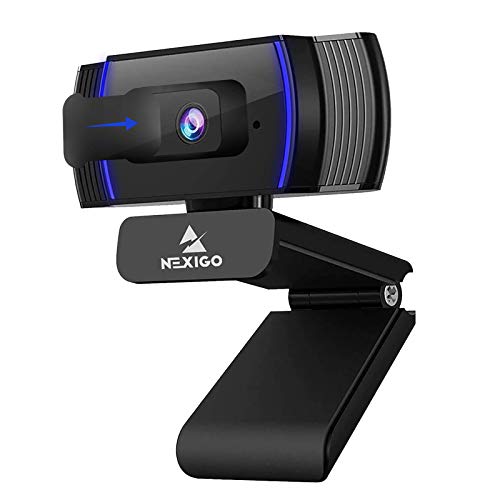
The NexiGo N930AF features auto-focus for consistently sharp video, a privacy cover to guard against lens exposure when not in use, and a built-in microphone with noise suppression. The autofocus helps maintain clear subject detail as you move, while the privacy cover addresses security concerns. This webcam is ideal for desktop and laptop use, compatible with Zoom, Switch 2, Teams, Webex, and other conferencing platforms. Its plug-and-play setup makes it straightforward for students and professionals seeking dependable video quality.
Buying Guide: Key Purchase Considerations
- Resolution and frame rate: For sharp video, aim for 1080p at 30fps. Some models offer improved low-light performance or higher frame rates for fast-paced streaming.
- Built-in microphone quality: Look for dual or noise-canceling mics if you work in noisy spaces. Consider whether you need stereo audio or simply clear voice capture.
- Lens and field of view: Wide-angle lenses capture more of your environment, beneficial for group meetings and streaming. Adjustable FOV helps tailor shots to different spaces.
- Auto light correction and exposure: Cameras with automatic brightness/color adjustments perform better in variable lighting conditions.
- Privacy features: A physical privacy cover adds security when the camera is not in use.
- Software controls: Some webcams offer software to tweak exposure, white balance, zoom, and focus. This can improve customization for your space.
- Compatibility: Ensure the webcam works with your preferred video apps (Zoom, Teams, Google Meet, Switch, OBS) and operating system (Windows, macOS).
- Plug-and-play ease: USB setups should be straightforward, especially for non-technical users; look for devices labeled as Plug & Play.
- Budget and use case: For occasional calls, a basic model with solid audio is enough; for streaming or teaching, prioritize image quality and noise reduction features.
- Durability and accessories: Privacy covers, hard-wearing stands, and secure mounts add long-term value for desk setups.