Best Cameras for Work From Home Security and Productivity
For remote workers, a reliable camera setup can boost security, communication, and overall productivity. This guide highlights five top budget-friendly options that blend streaming clarity, smart features, and easy setup. Each option supports remote monitoring, two-way audio, and day/night performance to fit home offices, living rooms, or home studios. Read on to compare capabilities and find the best fit for your work-from-home routine.
| Product | Brand | Key Use | Connectivity | Notes |
|---|---|---|---|---|
| Tapo C101 1080P | Tapo | Home office monitoring, baby/pet cam | Wi-Fi | Local storage or cloud option |
| Kasa EC71 1080P Pan/Tilt | Kasa Smart | Room-wide coverage, nanny/pet cam | Wi-Fi | Patrol mode, motion tracking |
| EMEET C960 4K Webcam | EMEET | Video meetings, remote collaboration | USB | True 4K, auto light correction |
| Blink Mini | Blink | Indoor security, quick setup | Wi-Fi | Two-way audio, motion alerts |
| VSMAHOME 2K Cameras (2-Pack) | VSMAHOME | Whole-home monitoring, family safety | Wi-Fi | Color night vision, 2K clarity |
Tapo C101 1080P Indoor Security Camera

The Tapo C101 is designed for versatile indoor use, including work-from-home setups that require reliable motion alerts and clear two-way communication. It supports motion detection with instant push notifications and offers a 2-way audio experience with a built-in siren to deter unwanted activity. It operates on a 2.4GHz Wi-Fi network and provides night vision up to 30 feet, ensuring visibility during late shifts or daytime dark rooms. Local storage avoids monthly fees, with optional cloud options for continuous recording.
Kasa EC71 1080p Pan/Tilt Indoor Camera

The EC71 expands room coverage with 360° horizontal and 113° vertical pan/tilt, enabling wide-angle monitoring for home offices and living spaces. It supports motion tracking and instant notifications, and can detect baby crying for use as a nanny camera. Like other Kasa models, it connects via 2.4GHz Wi-Fi and offers a local storage option with the possibility of cloud storage, providing flexibility for data retention without mandatory subscriptions.
EMEET C960 4K Webcam

The EMEET C960 delivers true 4K resolution with PDAF auto-focus for crisp, reliable video during remote meetings. It includes dual omnidirectional microphones and auto light correction to maintain clear audio and visuals in varying lighting. While primarily positioned as a webcam, its high-resolution output makes it a strong choice for professional work-from-home calls, virtual presentations, and digital collaboration, with easy plug-and-play setup.
Blink Mini Indoor Camera
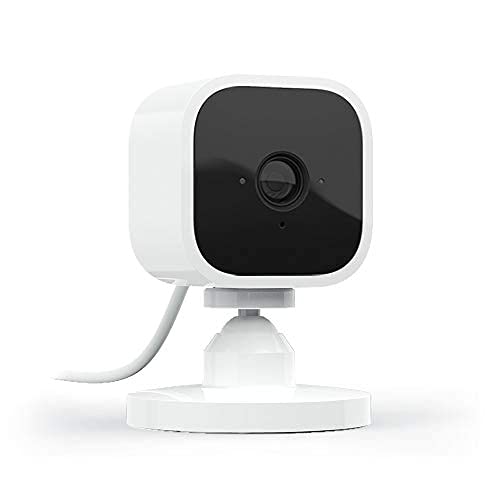
The Blink Mini provides simple, plug-in installation with 1080p HD streaming and night vision. It offers two-way audio so you can communicate with others or pets from your computer or phone. Motion detection and customizable activity zones help focus monitoring on your work area, making it a practical option for home offices or small apartments where straightforward, reliable surveillance is needed without a complex setup.
VSMAHOME 2K Indoor/Outdoor Cameras (2-Pack)

This 2-pack from VSMAHOME is geared toward flexible home security with 2K resolution for crisp daytime and nighttime footage. It supports color night vision, 24/7 recording, and 2-way audio. The system is suitable for securing multiple work-from-home zones, such as a home office plus a living area or entryway. The kit emphasizes reliable all-season performance and a straightforward setup for quick deployment without professional installation concerns.
Buying Guide
Key purchase considerations for work-from-home camera setups include resolution needs, field of view, and storage options. If you frequently participate in video calls, a high-quality webcam (like the 4K model) improves on-screen presence, while indoor security cameras add ambient monitoring for safety and adherence to remote work policies.
- Resolution and frame rate: Higher resolution screens more detail, but consider bandwidth and storage constraints. 1080p is typically sufficient for office monitoring; 4K offers crisper video for meetings when used as a webcam.
- Field of view and pan/tilt: A wider view helps cover desks, rooms, and entrances. Pan/tilt features allow you to monitor multiple zones from a single device.
- Audio: Two-way audio is essential for communicating with colleagues, family, or service providers. Built-in mics and speakers vary in quality; choose a model with noise reduction if possible.
- Storage options: Local storage (microSD or network storage) avoids ongoing fees, while cloud options offer longer retention. Determine your comfort with monthly plans.
- Night vision: Color night vision is helpful for well-lit rooms, while infrared is common for standard night-time use. Light sensitivity matters for office spaces with ambient lighting.
- Power and connectivity: USB webcams are simple for desktops, while battery-powered or plug-in options suit different setups. Ensure your home network supports reliable 2.4GHz Wi-Fi for cameras that depend on wireless connections.
- Expansion and compatibility: If you plan to scale, choose a system with add-on cameras or a brand that supports multi-camera management without subscription mandates.