Best Cameras for Video Calls: Clear, Reliable Webcams for Every Setup
Choosing the right webcam can dramatically improve your video calls, meetings, and remote collaboration. This guide highlights five top options designed for crisp visuals, clear audio, and user-friendly features. From built-in lighting enhancements to noise-reducing mics and privacy covers, these picks cover a range of needs—home offices, classrooms, and business environments. Review the options below to find a camera that fits your display, lighting, and workflow requirements.
| Product | Best For | Highlights |
|---|---|---|
| Logitech C920x HD Pro | All-around reliability | Full HD 1080p, autofocus, light correction |
| Logitech Brio 101 | Low-light clarity & privacy | Auto-Light Balance, built-in mic, privacy considerations |
| NexiGo N60 | Budget-friendly with wide angles | 1080p, adjustable FOV, software controls |
| EMEET C960 4K | High-detail video | 4K capability (switchable), dual mics, auto light correction |
| EMEET 1080P C960 (second listing) | Professional office use | 2 mics, privacy cover, 90° FOV |
Below are five cameras selected for strong video performance, broad compatibility, and practical features for everyday video calls. Each entry includes a brief overview of its strengths and how it can fit into different setups.
Logitech C920x HD Pro Webcam

The Logitech C920x HD Pro offers full 1080p video at 30fps with reliable autofocus and HD light correction, ensuring bright, crisp images even in suboptimal lighting. Its compatibility with major video conferencing platforms makes it a versatile choice for home offices and shared workstations. Features highlight automatic lighting adjustments and adaptable image sharpness, contributing to a professional appearance during calls and streams.
Logitech Brio 101 Full HD Webcam

The Logitech Brio 101 is designed for meetings and streaming with Auto-Light Balance, increasing brightness by up to 50% to minimize shadows in varied environments. It features a built-in microphone for clear voice capture and is compatible with a range of conferencing platforms, including Zoom and Teams. It also supports compatibility with Nintendo Switch 2’s GameChat mode for versatility beyond typical video calls.
MTORED USB 1080P Web Cam

The MTORED webcam delivers Full HD 1080p video with a wide-angle lens and a built-in microphone. Automatic light correction helps maintain clear images in mixed lighting, while the rotatable tripod and privacy cover provide flexible placement and privacy when not in use. This model is well-suited for users who want a straightforward setup with easy mounting options for desktops and laptops.
EMEET C960 4K Webcam

EMEET’s C960 4K webcam showcases true 4K resolution with PDAF auto-focus for stable clarity in business meetings and education settings. Its dual AI noise-cancelling mics, auto light correction, and a 73° FOV help emphasize the speaker while minimizing background distractions. Note that some software may switch to 1080p by default, with 4K available via software or apps like PotPlayer/OBS.
NexiGo N60 1080P Webcam

The NexiGo N60 delivers full HD 1080p with a wide 110° field of view, helpful for group calls or demonstrations. The built-in noise-cancelling microphone reduces ambient noise, and the included software allows exposure and FOV adjustments. It’s a practical option for office setups that need a balance of image quality, flexibility, and cost.
Logitech C270 HD Webcam

The Logitech C270 provides reliable 720p video with light correction and a noise-reducing microphone ideal for casual video calls and everyday use. It’s a compact, affordable option that fits smaller desks or secondary setups, offering straightforward plug-and-play compatibility with Zoom, Skype, and other platforms.
EMEET 1080P Web Camera (C960)
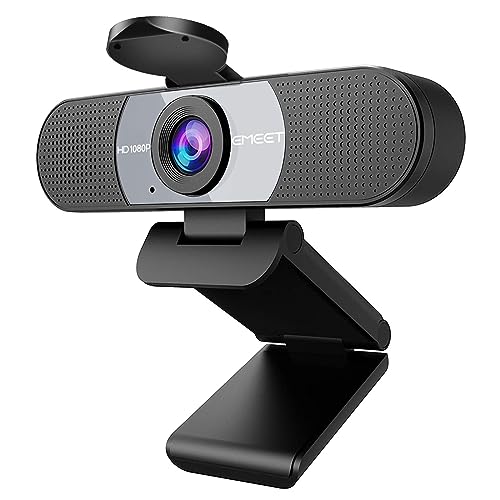
This EMEET C960 model brings a robust 1080p resolution with a pair of noise-reducing microphones and a privacy cover. It emphasizes a balanced FOV and reliable performance across calls, conferencing, and streaming needs. It’s a solid choice for those prioritizing clear audio and consistent video in standard office environments.
Buying Guide
- Video quality: Look for at least 1080p recording when possible, with options for 4K on capable models. Consider sensors, frame rate (prefer 30fps or higher), and autofocus performance for stable, sharp images.
- Low-light performance: Auto light balance and HDR-like correction help prevent dark, underexposed faces. If you frequently work in dim rooms, prioritize cameras with strong low-light features.
- Microphones: Built-in mics vary in pickup range and noise suppression. Dual mics or noise-cancelling mics reduce background noise for clearer calls, especially in busy environments.
- Field of view: A wider FOV (e.g., 90–110°) is useful for group calls or demonstrations, but narrower FOVs can be better for focusing on a single speaker.
- Privacy and security: Privacy covers and physical shutters help protect against accidental exposure when not in use. Consider models with easy access to the cover.
- Software and compatibility: Ensure the camera works smoothly with your preferred platforms (Zoom, Teams, Google Meet, etc.). Some cameras offer bundled software for exposure and color adjustments.
- Mounting flexibility: Tripod compatibility and secure desk mounts can affect placement. Rotatable stands and clip-on options expand where you can place the camera.
- Ease of use: Plug-and-play with USB connections reduces setup time. Look for straightforward controls for quick adjustments during calls.
The selection above balances price, performance, and feature sets across common video-call scenarios. For home offices prioritizing image fidelity, cameras with auto-light correction and strong mics are recommended. For shared spaces or classrooms, models with wide angles and reliable noise suppression can enhance group communication. Businesses focusing on privacy and security may prefer cameras with robust shutters or privacy covers. Ultimately, pairing a capable webcam with good lighting and a reliable microphone will yield the most consistent video-call experience.