Best Cameras for OBS: Top 5 Picks for Streamers and Content Creators
Streaming and content creation rely on clear visuals and reliable autofocus. This guide highlights five related camera options that pair well with OBS for live streaming, video meetings, and online teaching. From AI-powered dual-camera systems to high-resolution webcams with HDR, these picks cover different budgets and setups while emphasizing compatibility with OBS and other broadcasting software.
| Product | Brand | Key Benefit | Link |
|---|---|---|---|
| EMEET PIXY Dual-Camera AI-Powered PTZ 4K Webcam | EMEET | Dual-camera system with AI tracking and fast PDAF for stable framing | https://www.amazon.com/dp/B0G4MDV9WH?tag=lenstroop-20 |
| DEPSTECH DW50 Pro 4K Webcam | DEPSTECH | Sony sensor, remote control, and 3x digital zoom | https://www.amazon.com/dp/B0FMJY9QSM?tag=lenstroop-20 |
| Elgato Facecam MK.2 | Elgato | Premium 1080p60 with HDR and Camera Hub customization | https://www.amazon.com/dp/B0CW1S7XP5?tag=lenstroop-20 |
| Razer Kiyo V2 X | Razer | 1440p60, built-in mic, and fast Synapse-driven tweaks | https://www.amazon.com/dp/B0FNBLG4SD?tag=lenstroop-20 |
| VITADE Webcam 1080P 60fps | VITADE | 1080p/60fps with stereo mics and automatic light correction | https://www.amazon.com/dp/B07N3VWZ47?tag=lenstroop-20 |
EMEET PIXY Dual-Camera AI-Powered PTZ 4K Webcam
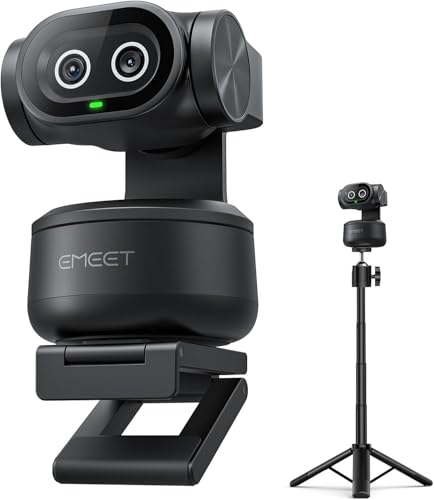
The EMEET PIXY Kit combines a main 4K imaging camera with PDAF autofocus and a 1/2.55″ Sony-type sensor, delivering crisp video for streaming and video calls. An auxiliary AI camera helps center subjects by predicting motion, aiding exposure and skin tone accuracy under varied lighting. The 0.2s blink-speed autofocus outpaces many standard webcams, which is especially useful for dynamic on-camera actions, quick gestures, and moving presenters. The kit includes a tripod with 360° swivel for flexible framing in portrait or landscape modes, enhancing studio versatility. A 310° pan and 180° tilt enable broader scene coverage and multi-angle shooting. The device supports OBS and other major platforms, making it a compelling option for creators who want a multi-angle or AI-assisted setup.
Key features include a universal 1/4″ screw compatible with most cameras and streaming gear, a stable tripod system, and AI-assisted tracking that maintains subject centering even during movement. For content creators who frequently switch between close-up talk segments and wider demonstrations, PIXY offers a practical, space-efficient solution that can upgrade a basic desk setup into a pro-style broadcast station.
How it helps OBS users
OBS performance benefits from the dual-camera approach by providing dynamic scene switches, picture-in-picture effects, and AI-driven focus transitions. The ability to share a main shot and an auxiliary tracking shot can create engaging tutorials, product showcases, and live demos without requiring expensive camera rigs. The device’s tracking and gesture controls simplify on-the-fly adjustments during streams, helping to keep the focus where it should be.
DEPSTECH DW50 Pro 4K Webcam

DEPSTECH offers a 4K webcam experience with a 1/2.55″ Sony sensor, delivering high-resolution imagery at 3840×2160 up to 30fps. The camera includes a remote for convenient control away from the desk, enabling 3x digital zoom, exposure adjustments, and auto vs fixed focus choices. Dual microphones with noise reduction help separate voice from ambient noise, which is valuable for broadcasts, online classes, or remote meetings. While the 4K detail is excellent for static shots, the 3x digital zoom works best with stable framing in fixed positions rather than rapid subject distance changes. Remote operation is a standout feature for presenting while away from the desk.
For OBS users, DEPSTECH provides a straightforward plug-and-play option with minimal driver requirements and broad compatibility across Windows and Mac. The mix of 4K quality, zoom flexibility, and remote-controlled features makes it suitable for educators, presenters, and remote workers who want precise framing without a complex setup.
Elgato Facecam MK.2

Elgato Facecam MK.2 targets professional-grade streaming with enhanced image quality and HDR capabilities in full HD 1080p at 60 frames per second. It leverages a Sony sensor to deliver richer color accuracy and smoother motion. The device integrates with Elgato’s Camera Hub software, which offers extensive customization similar to DSLR-like control over ISO, white balance, exposure, and color grading. The HDR feature helps mitigate high-contrast lighting scenarios, maintaining details in both bright and shadowed areas. The Power of OBS compatibility is reinforced by reliable software integration and easy scene management.
Observers note the premium build and the consistency of the image across lighting conditions. The combination of high-quality optics, robust software adjustments, and OBS friendliness makes the Elgato Facecam MK.2 a strong choice for streamers who prioritize image fidelity and a stable, repeatable setup in a studio environment.
Razer Kiyo V2 X Streaming Webcam
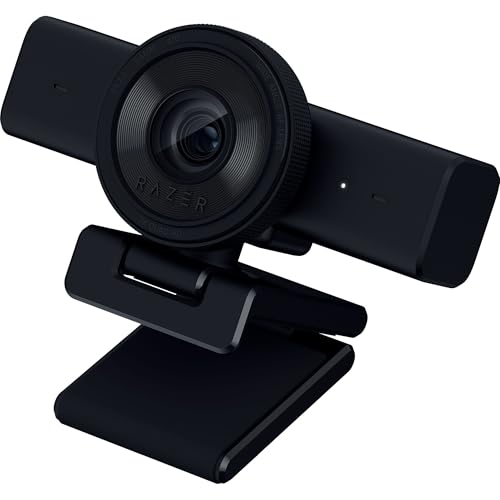
The Razer Kiyo V2 X focuses on delivering 1440p at 60 FPS with a wide-angle lens and a built-in microphone. The platform’s Synapse software enables quick presets and precise color and lighting controls, supporting a fast path from unboxed device to live-stream-ready configuration. The integrated privacy shutter provides an on/off security feature, a practical addition for privacy-conscious setups. While 1440p at 60fps provides excellent clarity, the camera’s dynamic range and low-light performance depend on room lighting. For OBS users who want rapid setup and flexible tuning, the Kiyo V2 X offers a balanced mix of performance and convenience.
Key considerations for OBS users include the importance of proper lighting to maximize the 1440p60 experience, the impact of room acoustics on the integrated mic, and how well Synapse-driven tweaks translate to live streams. The camera is well-suited for gaming, tutorials, and live discussions where responsive autofocus and smooth motion are valued.
VITADE Webcam 1080P 60fps

VITADE delivers 1080p at 60fps with dual omni-directional microphones and noise reduction for cleaner audio during streams and calls. The webcam includes automatic light correction to improve image quality in dim environments, ensuring more consistent skin tones and detail in varying lighting. An adjustable manual focus helps dial in the best sharpness for different shooting distances, making it a versatile option for desk setups, online education, and remote collaboration. While not 4K, 1080p60 remains widely compatible with OBS and other streaming software, offering reliable performance at a more approachable price point.
In OBS contexts, the VITADE webcam’s combination of color correction, focus control, and stereo audio capture helps maintain a clear, polished broadcast. It’s especially appealing for users who want a straightforward, dependable camera that won’t require extensive calibration work to produce good results in live streams and recorded videos.
Buying Guide: Key Purchase Considerations For OBS Setups
When selecting a camera for OBS, consider resolution and frame rate, autofocus speed, lighting performance, and audio integration. If you need multi-angle coverage or hands-free tracking, a dual-camera system or PTZ-enabled model can offer dramatic improvements in production value. For tight budgets or simpler workflows, a solid 1080p60 webcam with HDR and software controls provides reliable performance. Compatibility with OBS and easy scene switching are important, as are the availability of a useful accessory ecosystem—tripods, remote controls, or privacy features.
- Resolution and frame rate: 1080p60 is a common baseline; 4K offers more detail but can demand more bandwidth and processing power.
- Autofocus and exposure: Look for fast PDAF or AI-driven tracking for stable, well-lit shots during movement.
- Low-light performance: HDR or auto light correction helps maintain brightness and color accuracy in varying rooms.
- Audio quality: Built-in mics are convenient, but separate mics or USB audio interfaces can dramatically improve sound.
- Software and compatibility: Ensure the camera integrates cleanly with OBS and supports useful features via companion apps.
- Accessories: A stable tripod, adjustable mounting, and privacy shutters add versatility and peace of mind.
For content creators who require mobility and flexibility, dual-camera or PTZ setups provide dynamic scene changes and subject tracking. Those prioritizing simple operation can rely on high-quality 1080p60 webcams with strong color performance and reliable software control. Budget-conscious streamers may prefer cameras with good audio and automated lighting corrections to minimize post-processing.