Best Cable for Digital Camera: Quick Guide to Finding the Right USB Cables
For photographers, reliable data transfer cables are essential. Whether you’re syncing images to a PC, backing up memories, or charging on the go, the right cable reduces transfer time and wear on ports. This guide highlights five dependable USB data transfer cables compatible with a wide range of Canon, Nikon, and other cameras. Each option focuses on build quality, compatibility, and convenience, so you can pick the best cable for your digital camera setup.
Summary of Featured Cables
| Product | Brand | Length | Compatibility Highlights |
|---|---|---|---|
| SCOVEE Camera USB Cable Cord for Canon Rebel/PowerShot | SCOVEE | 6 ft | Canon PowerShot ELPH series, Rebel/DSLR/ELPH lines; Mini USB B 5-pin |
| Ancable UC-E6 USB Cable | Ancable | 3 ft | Nikon CoolPix, L/D/P series; Mini-B to USB |
| USB C Data Transfer Interface Cable for Canon/Nikon | ienza | 1.5–3 ft variants listed | Canon EOS/PowerShot with USB-C or micro/USB adapters; broad model list |
| SCOVEE 10FT Camera USB Cable | SCOVEE | 10 ft | Canon PowerShot ELPH and related models; long reach |
| USB Cable Photo Transfer UC-E6 for Nikon | ienza | 3 ft | Nikon D3300, D750, D5300, Coolpix; versatile transfer |
Below are five carefully chosen cables that cover popular camera brands and use cases, from short, portable cords to longer, studio-friendly options. Each product section includes direct access to the Amazon listing and a quick look at key features.
SCOVEE Canon/DSLR Mini USB Cable Cord
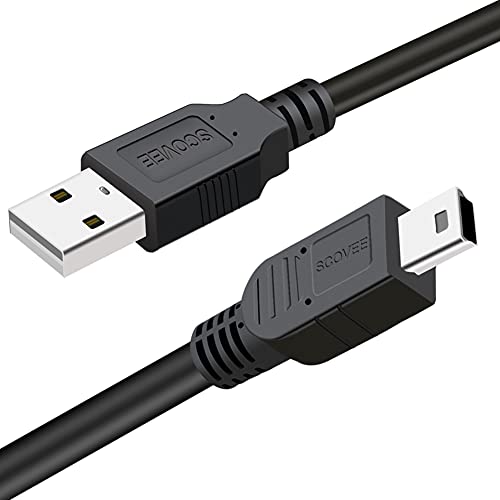
This SCOVEE cable is designed for a wide range of Canon devices, including Rebel series, PowerShot ELPH cameras, and other EOS/DSLR models that use a Mini USB B 5-pin connector. The cable facilitates fast data transfer of pictures, videos, and other files from camera to PC or Mac. Its broad compatibility list makes it a solid pick for photographers who own multiple Canon models or commonly move files between devices. The included compatibility notes also reference older IFC cables, signaling versatility for legacy cameras.
Key features include plug-and-play usability, a robust 6-foot length for flexible desk setups, and straightforward data transfer without the need for additional adapters. For users who frequently connect to a computer, this cable provides a reliable link with minimal setup. Its 5-pin mini-B design is a standard among several Canon cameras, which helps ensure broad compatibility within that ecosystem.
Considerations: If you primarily shoot using newer, USB-C-based cameras, this Mini USB B option may require a separate adapter for full USB-C support. For studio or desk-based workflows, 6 feet offers a comfortable working distance without being cumbersome.
Ancable UC-E6 USB Cable
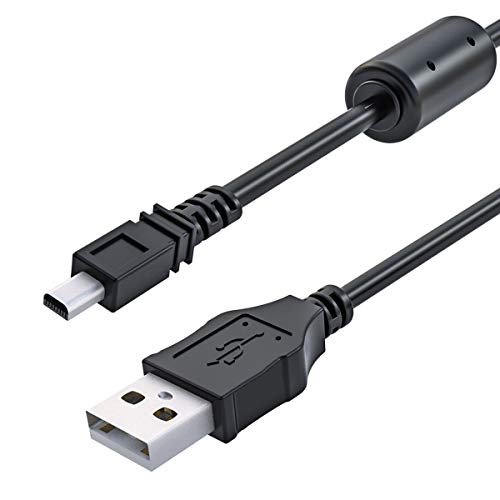
The Ancable UC-E6 USB cable is aimed at Nikon users, offering a compact 3-foot length that is easy to carry and store. It connects Nikon CoolPix, L-series, D-series, and other compatible cameras to a computer for quick photo transfers. The cable is described as “tangle-free” and “plug and play,” emphasizing a smooth, hassle-free setup. High-quality construction is highlighted, with an emphasis on maximizing data integrity during transfers and minimizing signal loss, which helps ensure reliable image downloads without repeated retries.
Practical use cases include quick offload sessions after a shoot, on-location transfer to a laptop, or backing up images to a desktop workstation. The shorter length keeps cables tidy in busy workstations. This option is particularly suited for photographers who primarily use Nikon bodies and want a straightforward, dependable transfer cable without extra features or complexity.
Considerations: The UC-E6 is best when you want a concise, travel-friendly cord. If you require longer runs, pairing with a longer accessory or choosing a longer model may suit studio environments better.
USB C Data Transfer Interface Cable for Canon/Nikon

This interface cable fromienza focuses on USB-C connectivity with a broad model compatibility list that includes Canon EOS Rebels, PowerShots, and various Nikon DSLRs. The listing notes that the USB-C cable enables downloading photos and videos to a PC, laptop, or smartphone with a USB-C port. The product emphasizes compatibility with camera models that require IFC-400PCU, IFC-200U, or IFC-500U cables, suggesting a flexible bridge solution for users who need to connect newer devices via USB-C to older data transfer standards.
Ideal for travelers or creators who rely on newer devices like MacBooks with USB-C, this cable supports a modern port configuration while remaining usable with a wide array of Canon and Nikon cameras. Typical transfer expectations include image and video file downloads from camera memory to your primary device for quick editing or sharing.
Considerations: While USB-C compatibility is a strong selling point, always verify your exact camera model and the required cable standard (IFC variants) to ensure seamless operation. Some users may require adapters for fully cross-brand workflows.
SCOVEE 10FT Canon Camera USB Cable
The 10-foot SCOVEE camera USB cable extends the reach beyond a typical desk setup, making it well-suited for studio spaces, desktops with mounted cameras, or field work where the PC is not immediately adjacent. It targets Canon users with compatibility for PowerShot ELPH series and a wide list of related cameras, including various EOS/DSLR models and camcorders. The longer length helps prevent tension on the cable during transfers and charging sessions, providing flexibility during shooting sessions or post-processing workflows.
Key considerations include cable durability and connector integrity over longer runs. A longer cable can also be more susceptible to tangling if not managed properly, so using cable organizers can help maintain a clean workspace. This option emphasizes broad compatibility with Canon models while offering a practical length for more dynamic shooting environments.
Considerations: If most of your work is on a compact, mobile setup, a shorter cable may be more convenient. For studio or on-location shoots where the PC is far from the camera, the 10-foot length offers a noticeable advantage.
USB Cable UC-E6 for Nikon D3300 and More

This Nikon-focused UC-E6 cable fromienza is tailored for a range of Nikon DSLRs and Coolpix models, including popular lines like D3300, D5200, D5600, D750, and more. The description highlights broad compatibility with Nikon cameras and the typical use case of downloading images via USB to a Mac or PC. It’s a practical choice for Nikon shooters who want a dependable, no-frills transfer cable without extra features that are unrelated to data transfer.
Practical use includes fast image transfers to a computer, straightforward setup, and stable connections that minimize data loss. The cable is especially useful for photographers who maintain a Nikon-centric workflow and prefer a compact, easy-to-store option that travels well.
Considerations: Always confirm your exact camera model to ensure UC-E6 compatibility, especially for newer Nikon bodies or unique editions. If you require higher-speed transfers or extended lengths, look for cables designed for USB 3.0 or longer formats.
Buying Guide: Key Purchase Considerations
When choosing a cable for digital cameras, consider these factors to align with your workflow and gear:
- Compatibility: Check your camera model against the cable’s listed compatibility. Some brands use specific IFC cable standards (IFC-200U, IFC-400PCU, etc.).
- Connector Type: Mini USB B is common on older Canon and Nikon cameras, while newer models may use USB-C or Micro-USB. Ensure the cable end matches your camera’s port.
- Length: Short cables save space and minimize clutter; long cables offer flexibility for off-center setups or studio work. Choose a length that fits your typical workspace.
- Durability: Look for solid connectors, reinforced stress relief, and tangle-free design if you plan to carry cables on shoots or travel.
- Speed and Compatibility: USB 2.0 cables are common for photo transfers, but USB-C and newer standards may improve speed for large RAW files or 4K video transfers. If your camera supports faster transfer, consider a cable that matches your device’s capabilities.
- Portability vs. Robustness: A compact cable is easy to pocket, while a rugged or braided cable can withstand frequent use in demanding environments.
In practice, photographers often prefer a small set of cables that cover their most-used camera lines. For mixed-brand studios, selecting a few versatile options with broad compatibility can simplify inventory and reduce the risk of port incompatibility during shoots.