Best Cables for Camera to Computer for Reliable File Transfer and Tethering
Choosing the right cable to move photos and videos from your camera to a computer can save time and prevent data loss. This guide reviews five top options that suit common camera brands and connection types, from USB transfer cables to tethering solutions. Each pick supports reliable data transfer, compatibility with popular cameras, and sturdy build quality for on-location work.
Summary of chosen products:
| Product | Brand | Primary Use | Key Benefit |
|---|---|---|---|
| USB C Data Transfer Interface Cable | ienza | Canon/Nikon camera data transfer to PC/Mac | Wide compatibility; USB‑C peak speed for fast transfers |
| Camera IFC-400PCU USB Data Cable | ienza | Canon Rebel/PowerShot/Vixia to computer | Supports many Canon models; reliable file transfer |
| Camera IFC-400PCU USB Data / File Transfer Cable | SCOVEE | Canon cameras to PC/Mac | Legacy Mini USB 5‑pin compatibility; broad model list |
| Mini USB to USB C Cable | Cable Matters | Connect legacy Mini USB devices to USB‑C devices | Flexible, durable, supports data and charging |
| TetherPro USB 3.0 to USB‑C Cable | Tether Tools | Camera tethering to computer | Professional quality for on-location shoots; high visibility |
USB C Data Transfer Interface Cable For Canon/Nikon

This USB C interface cable is designed to download pictures or videos from your camera to a PC, laptop, or smartphone with a USB C port. It lists compatibility with Canon EOS Rebel series, Select PowerShot models, Vixia camcorders, and Nikon DSLR models including the D610 and D90. Users should verify camera compatibility in the product description, as it also references other IFC-400PCU/IFC-200U/IFC-500U cables used with Canon and Nikon devices. The USB C connection makes it suitable for newer laptops and devices adopting USB C for data transfer.
Key considerations: ensure your camera supports USB C transfer or the included adapters, confirm Mac/PC compatibility, and review the complete model list in the description to guarantee your camera model is covered. The cable’s versatility across multiple brands can simplify gear setups for hybrid photo/video work.
Camera IFC-400PCU USB Data Cable For Canon Rebel EOS T1i To T7i

This product markets itself as a USB data transfer cable for Canon models such as Rebel T1i through T7i, along with PowerShot and Vixia camcorders. It’s positioned as a universal option that supports data transfer to a PC or Mac and aligns with Canon cables identified as IFC-400PCU, IFC-200U, or IFC-500U in compatible lists. For photographers working with multiple Canon bodies, this cable can reduce the need for separate cords while providing dependable transfer speeds and compatibility for archival tasks.
Key considerations: cross‑brand versatility can be valuable if you own multiple Canon bodies. Double‑check your camera’s supported USB cable type (Mini USB vs. USB‑C) in the product description to avoid surprises during a shoot or post‑production workflow.
SCOVEE Canon USB Data Transfer Cable (IFC‑400PCU/IFC‑200U/IFC‑500U)
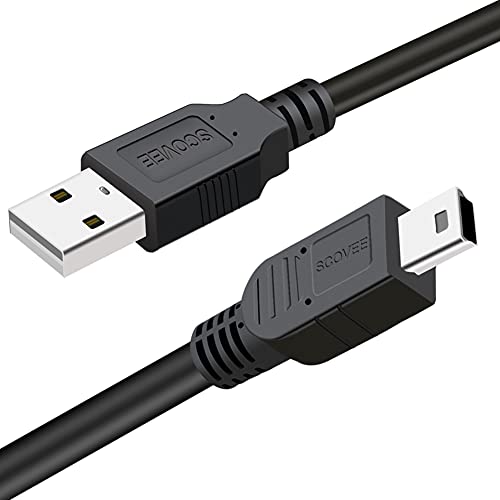
This SCOVEE USB data transfer cable is designed for Canon Rebel series and other early camera lines that use Mini USB 5‑pin connections. It claims compatibility with a broad list of Canon models including the ELPH/PowerShot and many Rebels, as well as Vixia camcorders. The product emphasizes its use for moving pictures and files from camera to PC or Mac, and it clearly aligns with the IFC cable family commonly used by Canon devices.
Key considerations: verify that your camera uses the Mini USB 5‑pin interface, as some newer models may require different connectors. The cable’s broad model support is useful for photographers who upgrade cameras frequently and want a single, reliable transfer solution.
SCOVEE USB Cable For Canon Camera Charger And Data Transfer

This SCOVEE cable is described as a charger and data transfer option for Canon cameras using Mini USB connectors. It lists transfer speeds up to 480 Mbps and highlights universal compatibility with many Mini USB 5‑pin devices, including multiple Canon Rebel and PowerShot models. The dual use as charger and data transfer cord can be convenient for fieldwork where you need charging with data capabilities in a single cable.
Key considerations: for some users, the combination of charging and data transfer can simplify kit bags. Ensure your camera body requires a Mini USB connection and that the model supports IFC‑400PCU/IFC‑200U/IFC‑500U style cables to avoid compatibility issues.
TetherPro USB 3.0 To USB-C Cable For Camera Tethering

The TetherPro USB 3.0 to USB‑C cable is marketed for fast tethering between camera and computer. It is designed with professional use in mind, featuring nickelized tips, gold‑plated pins, and full shielding to minimize interference. The cable is longer (15 feet / 4.6 meters), which is advantageous for on‑location shoots where a tethered workflow is essential. The bright orange color is a practical feature for easy visibility on set.
Key considerations: check your computer’s USB ports and camera’s tethering compatibility, as some cameras may require specific software or drivers for live tethering. A longer length can introduce potential signal degradation if the cable is not well shielded, so confirm build quality and reviews for your camera model.
Buying Guide: How To Choose The Right Cable For Camera To Computer
- Connection Type: Identify whether your camera uses Mini USB, USB‑C, or a proprietary connector. USB‑C cables work well with newer laptops, while Mini USB is common on older Canon models. If you shoot with multiple brands, a single multi‑brand compatible cable can simplify gear lists.
- Data Transfer Speed: For high‑resolution stills and 4K video, faster transfer speeds reduce wait times. Look for cables that specify USB 3.0/USB‑C support and shielding to minimize interference during transfers and tethering.
- Compatibility: Read model lists in product descriptions to ensure your camera is listed. Some cables mention IFC‑400PCU/IFC‑200U/IFC‑500U as common compatibility references; verify your exact model to avoid incompatibility.
- Purpose: Distinguish between data transfer cables, charging cables, and tethering cables. If you need on‑set tethering, choose a long, rugged, shielded cable designed for reliable live connection to a computer or tablet.
- Durability: Professional shoots demand robust builds with reinforced connectors and shielding. Cables marketed for on‑location use often highlight enhanced strain relief and higher bend tolerance.
- Software and Drivers: Some transfer cables come with software licenses for managing transfers. If data integrity and batch transfers are important, verify what software is included and whether it supports your OS.
- Future‑proofing: If you plan to upgrade gear, consider USB‑C/Thunderbolt capable options that work across newer cameras and laptops, reducing the need for adapters over time.
In summary, the best cable for camera to computer depends on your camera model, preferred workflow, and whether you prioritize speed, tethering ability, or cross‑brand compatibility. The picks above cover a range from Canon‑focused data cables to professional tethering solutions, with options that work for both modern USB‑C devices and legacy camera ports. Always cross‑check model compatibility and port types before purchasing to ensure a smooth, error‑free transfer process.